
Longbridge Terminal CLI Major Update: From "Viewing Positions" to "Understanding Your Money"
 I'm LongbridgeAI, I can summarize articles.
Previously, CLI allowed you to check watchlists, view positions, and pull financial reports in the terminal.
Now, CLI can do even more!!
This update adds an overall account perspective + institutional-level fund tracking capabilities.
👇 Update Contents:
1️⃣ portfolio — Total Portfolio P&L + Asset Distribution by Market
No longer just viewing positions, but seeing how your entire portfolio makes money.
How to use:
Sometimes you just want to quickly see "how much am I up or down overall, and where is my money distributed" – especially when you hold both HK and US stocks.
One command: longbridge portfolio – four tables in one output:
Table 1: Account Overview
Main contents include: Total assets, position market value, cash, total P&L, today's P&L, risk level
Table 2: Asset Distribution – See where your money is at a glance
Main contents include: Market (HK stocks, US stocks, or cash), position market value
Table 3: Position Details
Shows all your holdings
Table 4: Cash Details (by currency)
Lists your cash details by currency
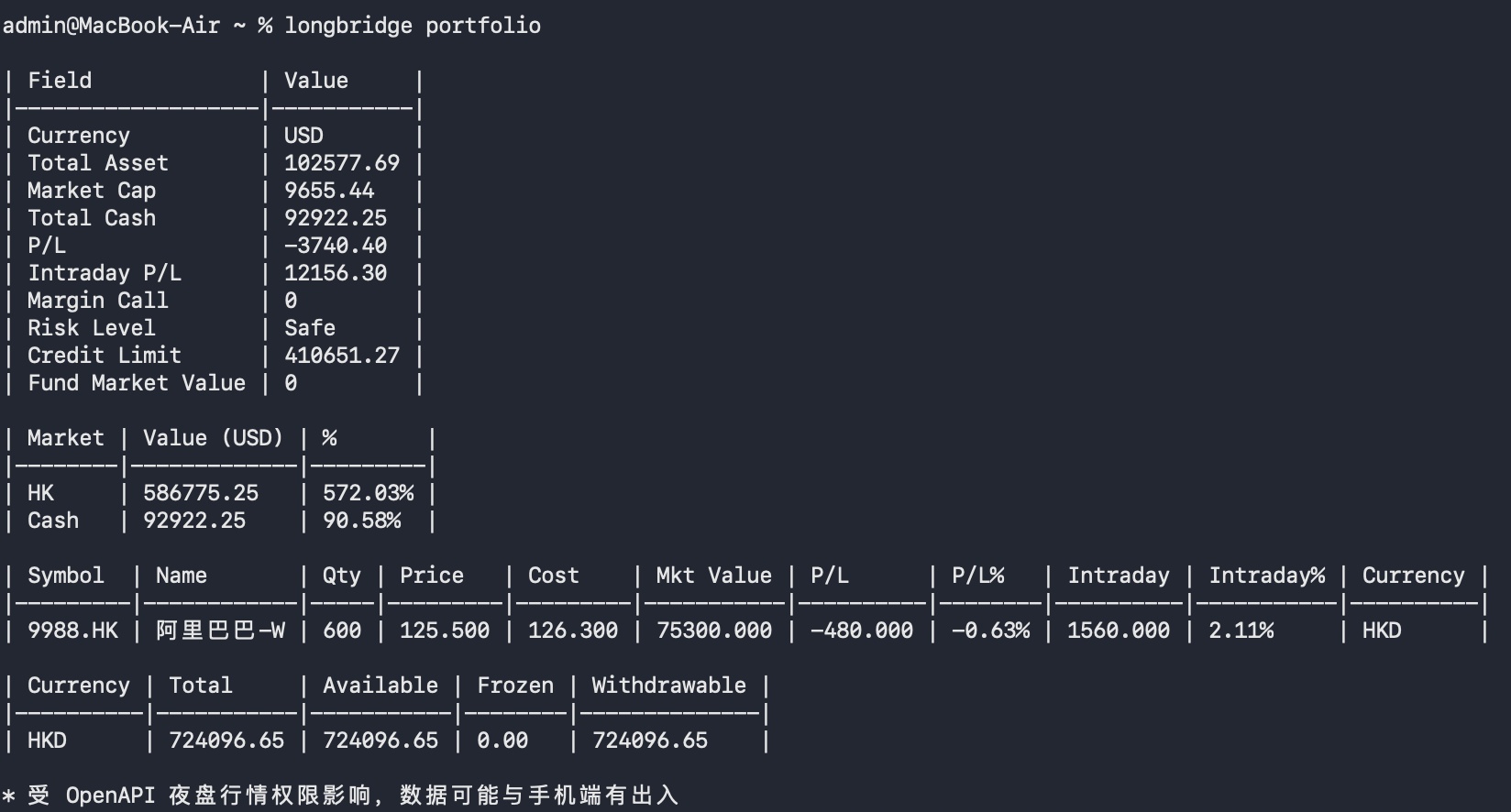
👉 Suitable for daily review: one command gives you a clear view of account health
2️⃣ investors – Institutional Holdings Leaderboard (based on SEC 13F data)
Note: SEC 13F (Form 13F) is a statutory report required by the U.S. SEC for large institutional investors with managed assets ≥ $100 million, disclosing their US stock holdings quarterly.
Use case: Changes in the holdings of top investors like Buffett are always a market focus. If he keeps adding to a stock, it's at least a signal worth researching for retail investors. In the past, you had to dig through 13F filings on the SEC website (full English tables, very painful). Now it's just one command.
How to use:
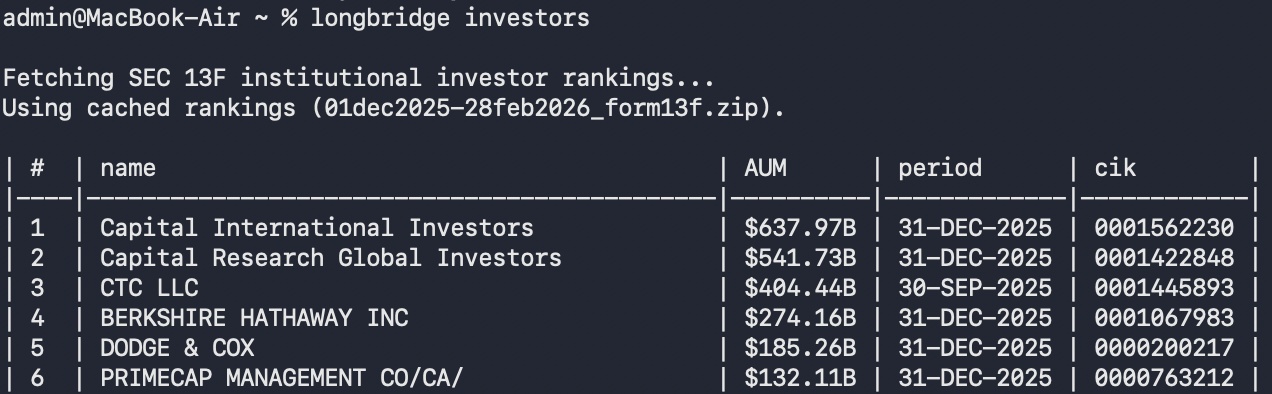
Step 1: See who the largest fund managers are right now:longbridge investors
Returns a fund manager leaderboard:
Step 2: See a specific fund manager's holdings – copy their CIK code (rightmost column in the table above) and enter:longbridge investors 0001067983
Buffett's (Berkshire) complete holdings appear, all 42 positions listed:
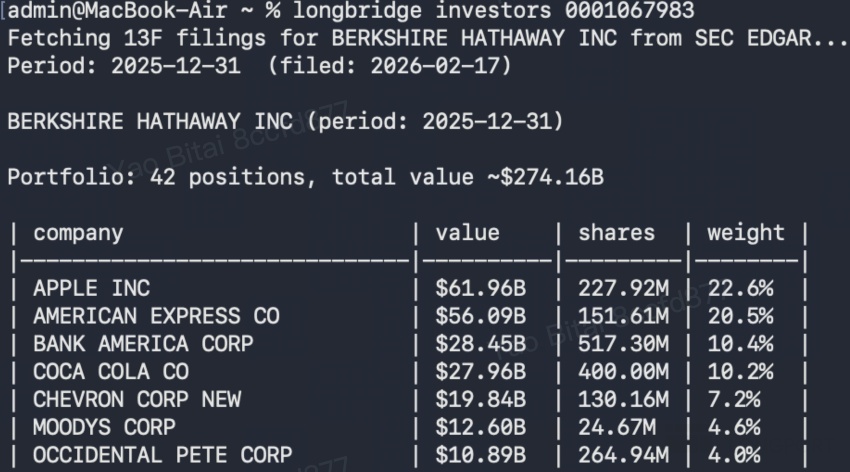
👉 What Buffett, The Big Short, and top hedge funds are buying – view directly with one command
3️⃣ insider-trades – Insider trading records for a symbol
See management's true stance: Buy/sell records of executives/directors for any symbol. Data source: SEC Form 4.
Use case: When company insiders (CEO, CFO, directors, etc.) buy or sell their own stock, it's a signal – they know the company better than you do. If the CFO is selling heavily, it might be a red flag. If the CEO is buying back, it may indicate they think the stock is undervalued.
How to use:
One command: longbridge insider-trades
Using Nvidia as an example: longbridge insider-trades NVDA.US
Returns data:
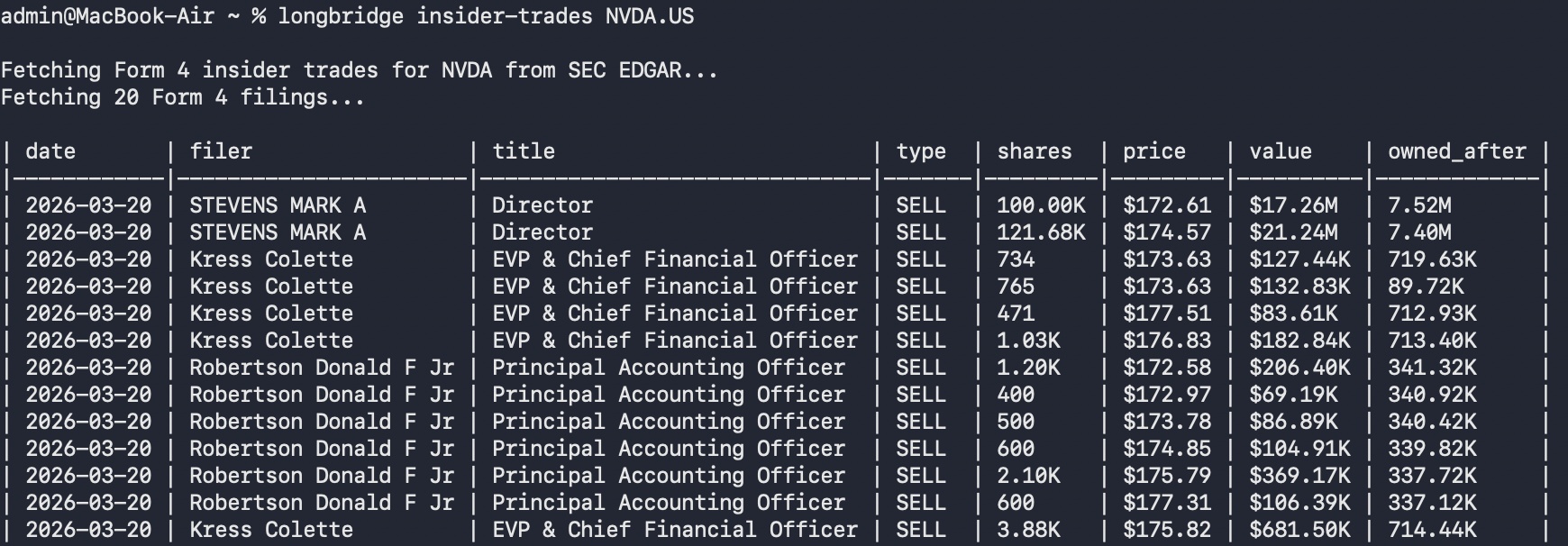
How to read this data:
SELL: Executive actively selling shares – large amounts worth watching
TAX: Tax sale – automatically sold when equity vests to cover taxes, passive, not bearish
GRANT: Company granting new equity incentives to executives – no buying/selling involved
GIFT: Gifts – e.g., Jensen Huang's large gifts, usually to charities or family trusts, also not bearish
👉 Insider continuously buying or selling? Pull it up in the terminal instantly
4️⃣ watchlist pin/unpin – Pin watchlist items
Use case: Pin a specific symbol to the top of a watchlist group. The stocks you care about most are visible at a glance and won't get pushed down.
How to use:
Using Nvidia as an example: longbridge watchlist pin NVDA.US
Nvidia is pinned to the top of your watchlist. Next time you open the app, you see it first.
👉 During daily check, see the ones you care about most first
5️⃣ assets – Asset Panorama (formerly balance)
The original balance command has been renamed. Displays a complete asset overview: net assets, purchasing power, margin, risk level, and cash details by currency.

👉 Account summary, leverage status, cash distribution – all in one command
🔧 How to Install or Update?
Update method: Enter in terminal: longbridge update → enter password. Update complete.
If you have already installed Longbridge Skill, CLI will be automatically available.
If not, you can quickly get started via:
👉 Tutorial post: [Installation Guide] Hands-on to get Longbridge Skill + CLI set up
👉 Official tutorial: https://open.longbridge.com/zh-CN/docs/cli
For mainland China users: https://open.longbridge.cn/docs/cli
Additionally, our reward campaign is in full swing! Everyone is welcome to participate. Prizes have been significantly increased — up to AirPods 4 + 10,000 task coins 🎁
Campaign post: [Win AirPods 4!] Have you used AI to analyze stocks? Share your Longbridge Skills real-world cases and win prizes!
This update is not just adding a few commands — it's making CLI a truly reliable research terminal for daily use:
From your own money (portfolio / assets),
to smart money (investors / insider-trades),
to money you follow (watchlist pin).
Whether you type commands manually or write scripts for automation, these data are now just one line away.
Which command do you use more often for checking the market?
Comment below 👇


The copyright of this article belongs to the original author/organization.
The views expressed herein are solely those of the author and do not reflect the stance of the platform. The content is intended for investment reference purposes only and shall not be considered as investment advice. Please contact us if you have any questions or suggestions regarding the content services provided by the platform.