
Before you research a stock — check its macro backdrop first
 I'm LongbridgeAI, I can summarize articles.
To research a stock, the last few CLI updates already have you covered: earnings, valuation, shareholders, short interest.
One layer was still missing: the macro environment.
CPI, PMI, interest rates, exchange rates —
this "macro backdrop" decides whether the stock you're researching has a tailwind or a headwind.
This update fills that gap in one go!
Core of this update: the new macrodata command
🌐 6 markets covered: US / HK / CN / EU / JP / SG
📊 600+ macro indicators: CPI / PMI / GDP / unemployment / interest rates / money supply / imports & exports / house prices / consumer confidence…
📈 History mode: pull any indicator over a date range and watch the trend shift
🤖 --format json: friendly for AI / script calls, plugs straight into an automated research flow
The full picture of this update
Category | Command / change | Notes |
New | macrodata | 600+ macro indicators across 6 markets; supports --country / history range / --format json |
Improved | constituent now supports ETFs | US ETFs pull full holdings via SEC N-PORT |
quote, US overnight | --format json now outputs an overnight field — no missing data for after-hours analysis | |
Live/Demo banner added to holdings commands | positions / assets / portfolio now clearly mark Live/Demo at the top | |
JSON timestamps switched to RFC 3339 | time-series output in ISO 8601 — AI/scripts no longer need to handle epoch | |
Local-timezone date parsing | --start / --end parsed in local time, avoiding UTC-offset pitfalls | |
auth login --auth-code | sign in outside the browser — works for AI agents / remote environments |
When to use macrodata
1. See which macro indicators each of the 6 markets has
longbridge macrodata # list the indicators across all markets
longbridge macrodata --country US # US only, around 368 indicators
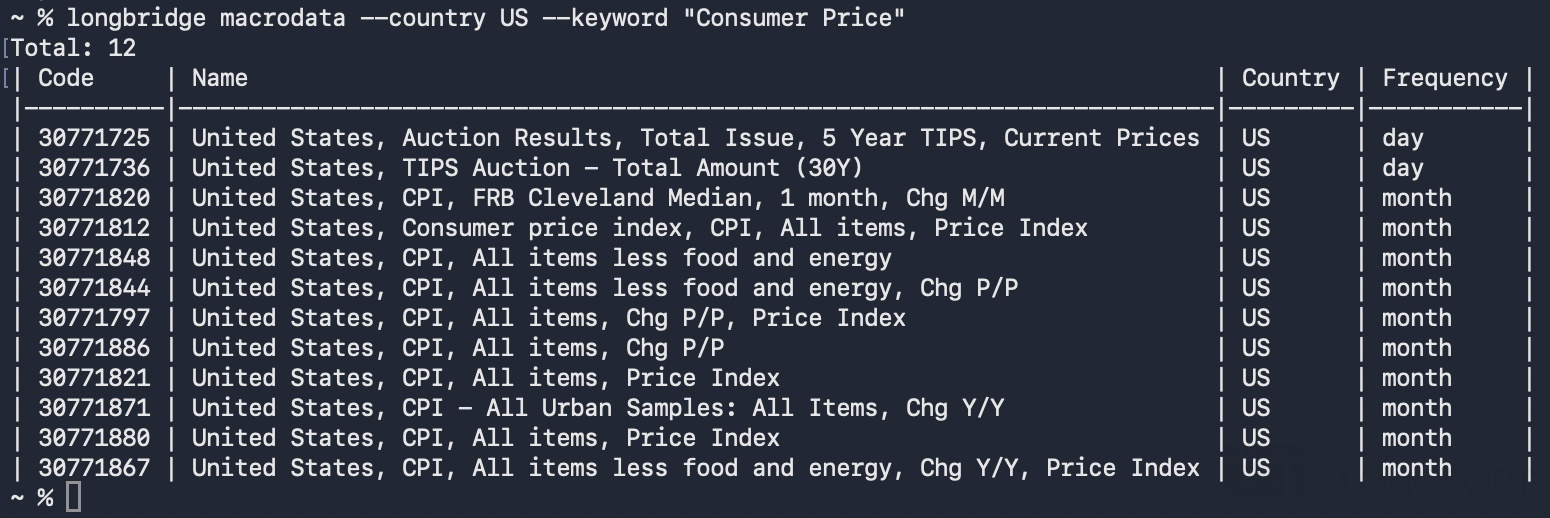
longbridge macrodata --country US --keyword "Consumer Price" # search by keyword, e.g. find US CPI
Use it for: before you start researching a new market, scan what macro signals that country has to track. When there are a lot of indicators, search with --keyword — faster than scrolling the list.
2. Pull the historical trend of an indicator
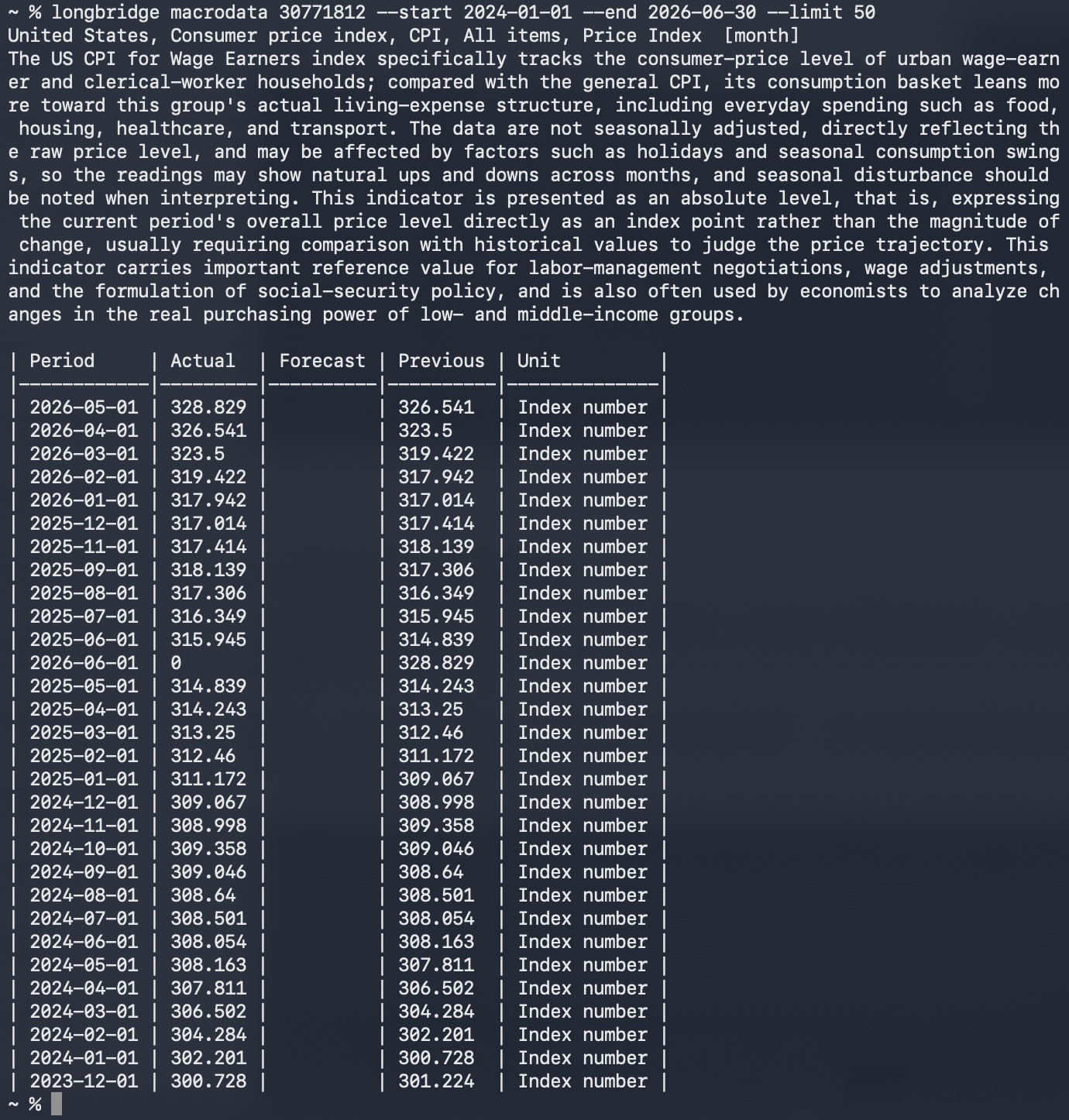
longbridge macrodata 30771812 --start 2024-01-01 --end 2026-06-30 # US CPI historical data
Use it for: a single data point means nothing — the history curve is what lets you judge. Is CPI ticking up or cooling off? How long has PMI been below 50? Where are we in the rate cycle?
3. AI / script use
longbridge macrodata --country US --format json
Use it for: feed an AI agent / automated research script so the model analyses real macro data instead of relying on its training memory.
How to wire macro into single-stock research
Two examples of how "macro → single stock" connects:
- Before researching China concept stocks — check the RMB exchange rate + China CPI / PMI first. A stronger RMB and a recovering PMI = a tailwind environment for China ADRs; the other way round, be choosier with names.
- Before researching US AI stocks — check US unemployment + the Fed's rate outlook first. Loose liquidity + steady jobs = the elevated valuation can hold up; in a tightening phase, watch out for a valuation de-rating.
This is why macrodata isn't about "looking at data" — it's the first step of research —
the research path goes from "look at one stock" → "actively find the next one" → and now "read the macro backdrop clearly".
🔧 How to install or update
To update: in your terminal, type longbridge update --> enter your password to finish updating.
To see what's in this update: longbridge update --release-notes
If you've already installed Longbridge Skill, the CLI is available automatically.
To install:
Not set up yet? Here's the quick way in:
- Tutorial post: [Installation Guide] Step-by-step to install Longbridge Skill + CLI
- Official docs: https://open.longbridge.com/docs/cli
- Mainland China users: https://open.longbridge.cn/docs/cli
Researching a stock — from the company to its shareholders to short interest, and now one more layer: the macro backdrop.
The CLI can do even more — run longbridge --help for the full command list.
Leave a comment to win:
What new feature would you like the CLI to add next? Tell us your use case 👇
🎁 Every valid comment earns 188 task coins
⏰ Event window: now through 2 July 2026, 7pm
Rewards will be paid out within 15 business days after the event ends.
* Longbridge reserves the right of final interpretation.
The copyright of this article belongs to the original author/organization.
The views expressed herein are solely those of the author and do not reflect the stance of the platform. The content is intended for investment reference purposes only and shall not be considered as investment advice. Please contact us if you have any questions or suggestions regarding the content services provided by the platform.