

Used the new CLI commands for a few days, focusing on insider-trades and investors.

After trying out this update, the two commands that impressed me the most are related to "smart money": insider-trades and investors.
One looks at insider trading, the other at institutional holdings. Let me share some practical experience using them.
insider-trades — Know in seconds whether executives are buying or selling
In the past, to check insider trades, you had to dig through Form 4 on the SEC website. Find the stock, find the person, check the date, number of shares, price... the whole process took at least five minutes.
Now it's done with one command:
text
longbridge insider-trades NVDA
It outputs a complete record: who, what position, transaction date, buy or sell, number of shares, price per share.
A real scenario.
Last week, a small-cap stock I held suddenly dropped quite a bit, and I felt unsure. In the past, I might have searched for news, looked at financial reports, asked around. This time, I directly ran insider-trades on the ticker.
I found that the CEO and CTO had each bought twice in the past month, totaling over a hundred thousand shares, with an average price higher than the current stock price.
Although you can't make decisions based solely on this, it at least indicates that insiders don't think the current price is expensive. I didn't sell, held on. It later rebounded.
I now run this command once a week, scanning all my holdings. Seeing consecutive buys gives me peace of mind; seeing concentrated selling raises a flag.
investors — Copy institutional moves without waiting for someone to compile the data
Another frequently used one is investors, based on SEC 13F data, showing active fund managers' holdings.
Two use cases I find most practical.
First, check the leaderboard.
text
longbridge investors
It directly outputs a recent leaderboard of active fund managers, showing who increased or decreased holdings, clear at a glance. Previously, you had to wait for someone to compile and publish it; now you can check anytime.
Second, look up a specific investor by CIK.
longbridge investors 0001067983
This CIK is for Berkshire Hathaway. Running it directly shows Buffett's latest holdings, and it includes real-time prices—this is better than many 13F summary websites, which usually only show quarter-end prices.
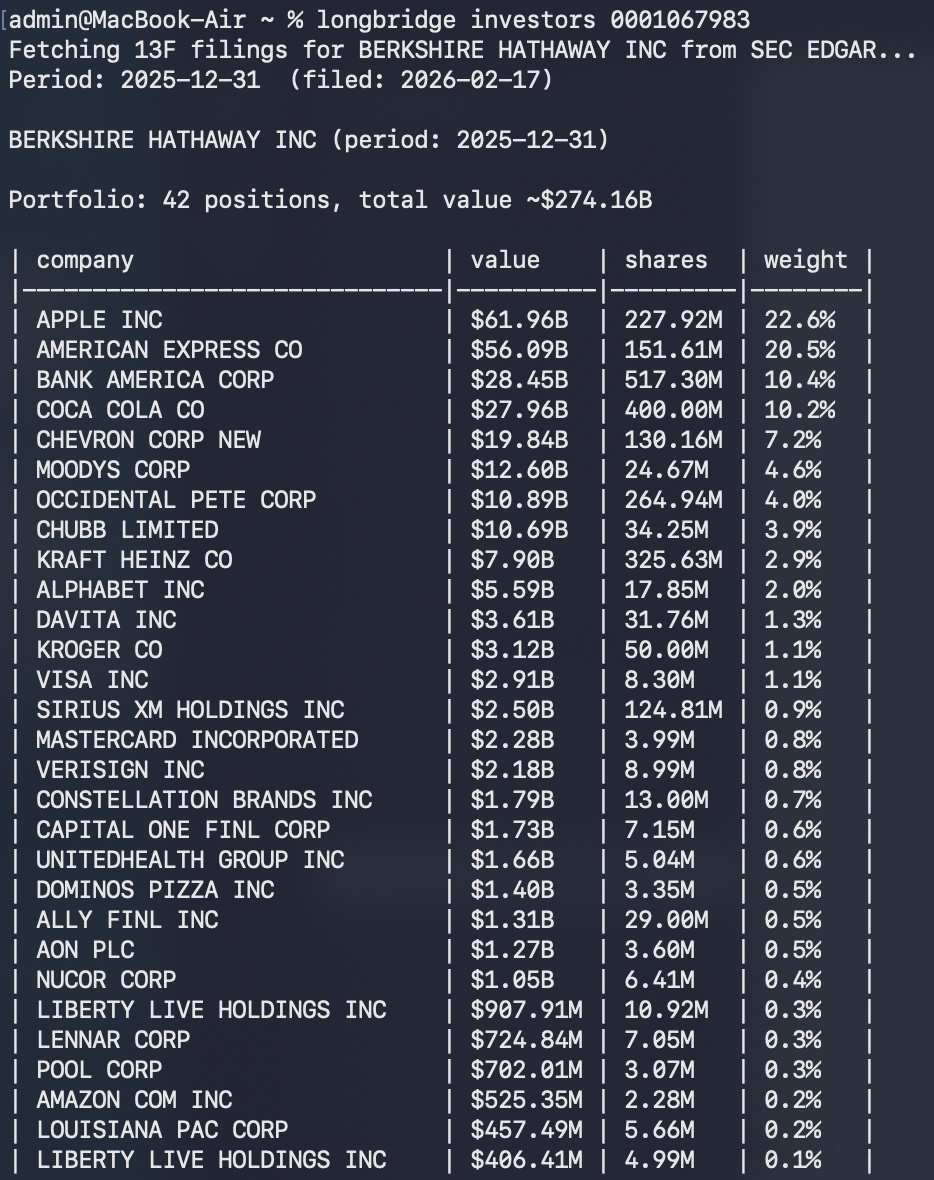
I tried looking up another well-known fund and found they had significantly increased their position in a certain consumer stock last quarter. Following this clue, I checked that company's financial reports and recent trends, and there was indeed fundamental support.
It's not about blindly following, but it at least provides a starting point for screening targets.
Using these two commands together
One looks at insiders (insider-trades), the other at institutions (investors).
Want to confirm if insiders are truly optimistic → insider-trades
Want to know where smart money is flowing → investors
My current workflow is roughly:
Use investors to scan the portfolio adjustments of top institutions, find a few targets that were added by multiple firms.
Screen out the interesting ones, then use insider-trades to see what insiders at these companies have been doing recently.
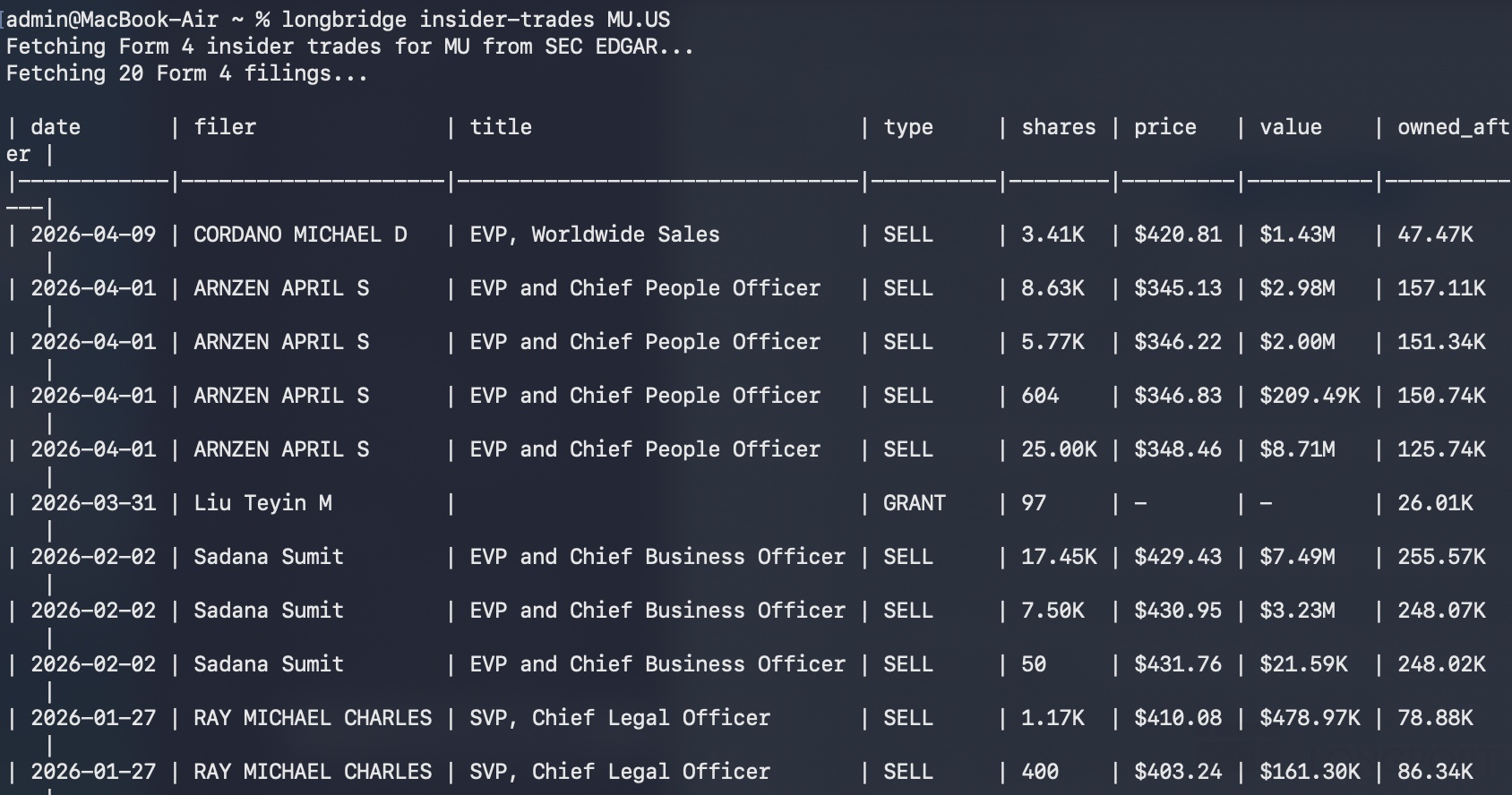
If both institutions and insiders are buying, add to the watchlist, and further examine financial reports and fundamentals.
Can't guarantee profits, but at least there's an extra layer of data support when making decisions.
A final word
Previously, CLI felt like "can query data." These two commands make me feel like "can assist in judgment." No need to dig through the SEC website, no need to wait for someone to compile 13F tables. Run it yourself anytime, check anytime.
If you also frequently track insider trades or institutional holdings, these two commands are worth spending ten minutes to try.
The copyright of this article belongs to the original author/organization.
The views expressed herein are solely those of the author and do not reflect the stance of the platform. The content is intended for investment reference purposes only and shall not be considered as investment advice. Please contact us if you have any questions or suggestions regarding the content services provided by the platform.
