

 Top 10 Influencers in 2025
 Markel
Longbridge AI 工具简易入门

There have been various experienced individuals who have connected to the official API and profited, and there are also many educational posts teaching us how to import parameters, listing numerous examples. There are already plenty of such case studies and short articles, so it wouldn't be very interesting for me, a junior, to write another one. Moreover, I'm probably the only StockPro who lost money after connecting, so I'm not really qualified to write about this 🤣. Therefore, I think my focus should be more on providing a basic introduction for some beginners.
How to understand the @LongbridgeAI tool?
You can think of it as an intelligent machine that automatically monitors the stock market for you, reads news, analyzes sentiment, and places orders.
However, it must be clarified that connecting to the API does not guarantee profits. While many experienced individuals started making money with quantitative trading, I, the junior, am probably the only one who lost money because I wasn't very good at setting it up and made mistakes with the parameters. This also serves as a perfect counter-example for everyone. A tool is just a tool; ultimately, whether you can make money with it depends on you as a person. If this method isn't suitable for you, then don't get caught up in FOMO (Fear Of Missing Out). Participate in the market using methods that suit you. After trying quantitative trading, I found I couldn't outperform others. I can also make money with value investing, so I went back to doing value investing.
Actually, setting up after connecting Longbridge AI is like playing Minecraft. Those who have played it know that we need to build a redstone automated farm inside. Connect the sensor (market data), processor (AI), and actuator (order placement) together, and then it will run on its own.
Step One: Prepare Your Toolbox
Before you start, you need to prepare these things:
- An account: Apply for a Longbridge developer Key (like an ID card for the robot).
- A brain: Install Python (the programming language, the robot's native tongue).
- A mouthpiece: Telegram Bot (the robot will send messages here praising itself when it makes money).
Step Two: The Robot's Four Organs
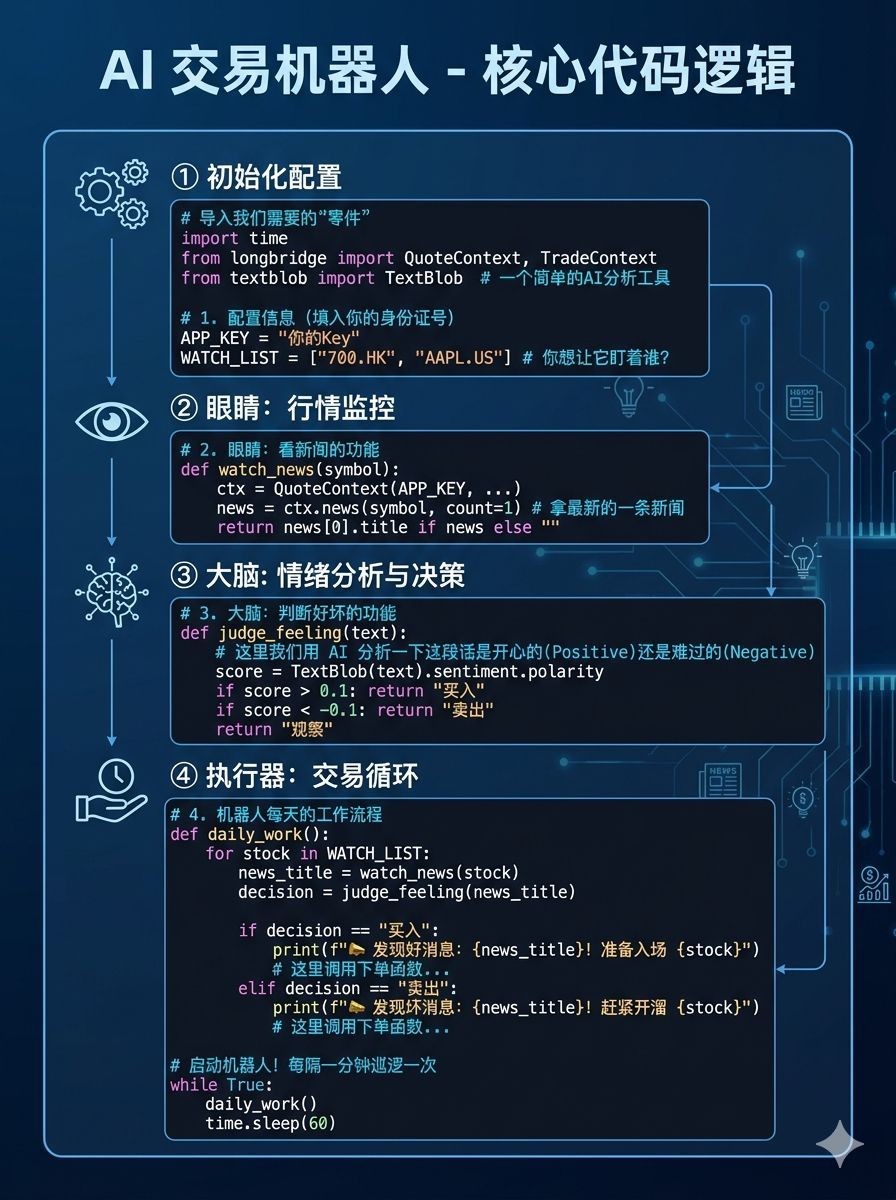
To get the robot moving, I broke it down into four easy-to-understand parts:
Organ Name | Corresponding Function | Plain English Translation |
|---|---|---|
Eyes (Quote) | Get market data/news | Constantly watches whether stocks are rising or falling, and sees what big news has come out. |
Brain (AI) | Sentiment analysis | Reads the news and judges whether it's "good news" or "bad news" for the stock price. |
Hands & Feet (Trade) | Automatic order placement | When it thinks the timing is right, it clicks "Buy" or "Sell" for you. |
Mouth (Notify) | Send notifications | Every time it does something, it will pop up a notification on your phone to let you know. |
Step Three: Combine the Code
You can think of the code below as the robot's instruction manual. I've integrated all the functions mentioned earlier into a simple structure:
Step Four: How to Actually Deploy It?
- Copy and paste: Save the code as my_robot.py.
- Install plugins: Type pip install longbridge textblob in your computer terminal (like installing mods for a game).
- Docker deployment: If you have a computer or server that runs 24/7, put it into a Docker container. It can then work silently like a Roomba while you're in class, sleeping, or gaming.
Personal Advice
Even with an AI assistant, remember:
- The stock market is not an ATM: AI can also misjudge, just like you can be careless on an exam.
- Simulate first, then go live: It's recommended to run it on a paper trading account for a few days first to see if it can actually make money, before putting in real money. Unless you want to experience losing money like I did.
- Stay curious: Code is just a tool. Real wealth comes from your understanding of how the world works.
Finally, reposting the official entry point
Longbridge Skill Official Website: https://open.longbridge.com/zh-CN/skill/
Mainland users can click: https://open.longbridge.cn/skill/
The copyright of this article belongs to the original author/organization.
The views expressed herein are solely those of the author and do not reflect the stance of the platform. The content is intended for investment reference purposes only and shall not be considered as investment advice. Please contact us if you have any questions or suggestions regarding the content services provided by the platform.
