
The AI creates online documents and web pages
The AI creates online collaborative documents and web pages you can open online, and codes in answers link to quotes.
Have the AI build web pages you can open online
View, download, and share AI-built web pages online, see the latest data when you reopen a dashboard, and jump back to any turn in long conversations.
Unless otherwise noted, the following updates are available on the LongbridgeAI web and mobile web versions, and the AI built into the Longbridge App will roll out with upcoming App updates.
Highlights
Have the AI build web pages you can open online
Web pages built by the AI can be viewed in the conversation, opened full screen, downloaded, and annotated, and shared links always show the latest version. Before others can view a page, change its sharing setting to “Anyone can view”; removing it from My Artifacts also deletes it permanently. It is also available in the AI built into the Longbridge App in Hong Kong and Singapore.

AI-built dashboards show the latest data when reopened
When the AI builds a web page that needs data, such as a market dashboard, it declares the data it needs and refreshes it automatically every time the page is opened, instead of freezing at the moment it was created. The bottom of the dashboard shows when the live data was last updated, and shared links show the latest data too. Web and mobile web only.

Jump back to any turn in a long conversation
Once a conversation has more than 3 turns, an outline bar appears on the right. Hover to preview a turn and click to jump to it. Web and mobile web only.

Share an Agent with others
Click “Share” at the top right of an Agent’s introduction page to create a shareable image with a QR code or copy a link. Web and mobile web only.

Website AI suggests questions based on the current page
Open the AI on a stock or article page of the Longbridge website, and the suggested questions focus on that stock or article.

Standalone release notes page
Release notes open without signing in, making them easy to forward. Web and mobile web only.

Clear progress for multi-step tasks
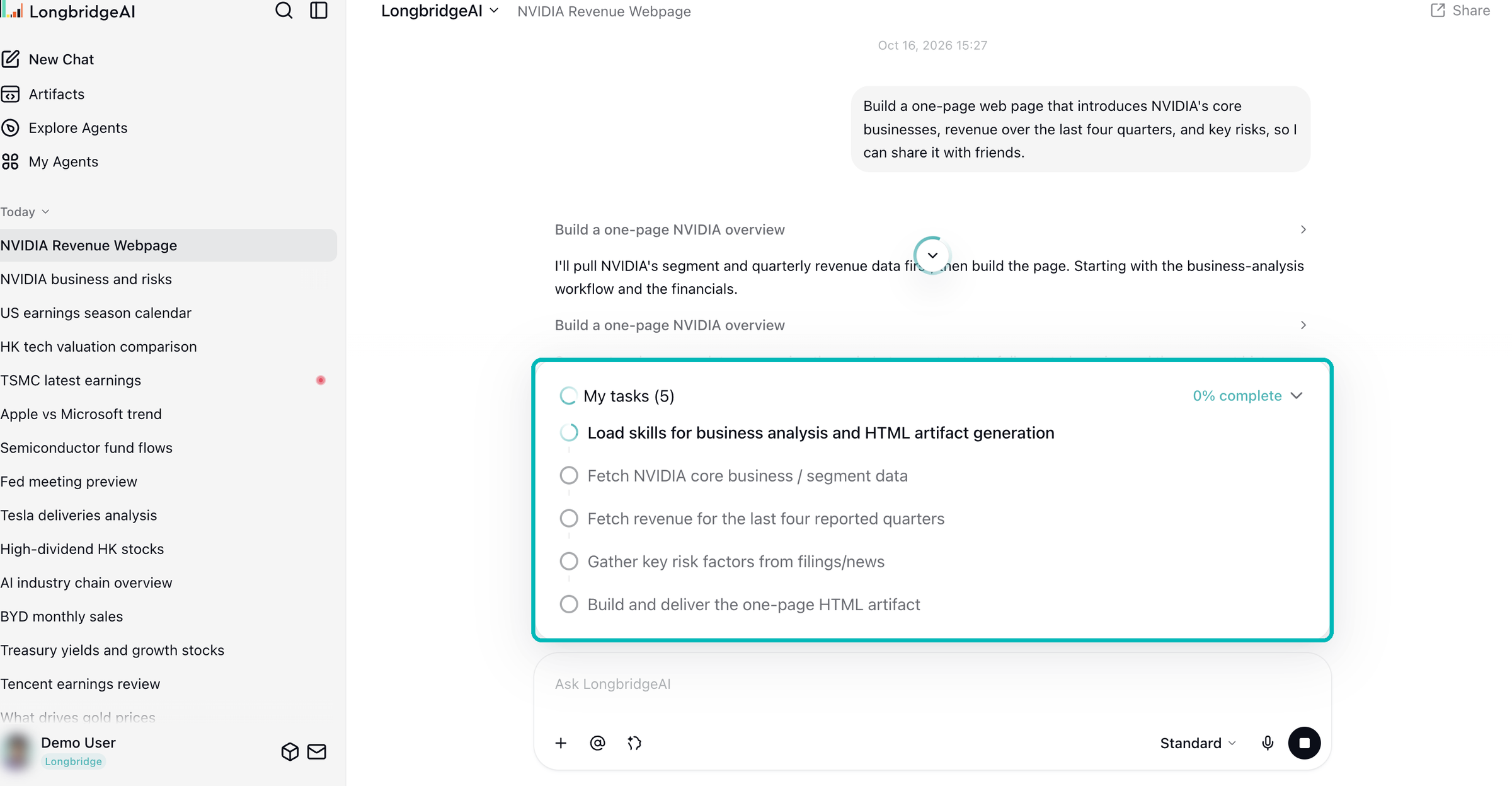
When the AI works through a multi-step task, a plan list appears above the input box. Expand it to see the status of each subtask; it collapses when the task is done.
Download online documents as Word, PDF, or Markdown
Open an online document from My Artifacts or a conversation and download it from the top right. Web and mobile web only.

Risk assessment opens beside the conversation
Click the risk assessment entry in an answer, and it opens on the right side of the page, so you can stay in the conversation. Tapping “Deposit” on a paper trading account now shows that deposits are not supported.

Resizable sidebar and collapsible groups
Drag the right edge of the left sidebar to resize it, click a group name to collapse it, and see conversations sorted by most recent activity. Web and mobile web only.

LongbridgeAI
New features
- The AI can look up financial data and check facts: When answering questions, the AI can retrieve financial data directly and check facts. Available on all versions.
Improvements
- Full questions when the AI asks you something: Long questions and options are no longer cut off, and multi-part questions show which page you are on.
- Interface details: Menu links on the release notes page are visible again in dark mode, and the action bar under answers now appears when you hover over it.
Bug fixes
- P&L card display: P&L cards in conversations no longer appear as raw data.
Usage changes
- Sharing a conversation also makes its artifacts public: When you share a message or an entire conversation, the online documents, web pages, and other artifacts in it are also made public, so anyone with the link can view them. Make sure this content can be made public before sharing. In effect on all versions.
- Continue from where you left off after trading password verification: After you verify your trading password, the answer continues from where it paused without asking again; if you cancel, the prompt no longer keeps reappearing. A brokerage account is required.
My Agents and workflow building
New features
- Ask users to fill in a form during a conversation: Agents can use the
RequestUserFormtool to pause during a run, ask users to fill in a form, and continue after it is submitted. Form questions are provided by the platform based on the form ID; custom questions are not yet supported. - Set a reasoning budget for your Agent: Set two reasoning usage limits for an Agent. Beyond the first, thinking depth is lowered automatically; beyond the second, the model stops calling tools and answers directly. Without these settings, behavior is unchanged.
- Enable “Auto” thinking depth for your Agent: Once enabled, users start conversations with the system choosing the thinking depth for each question by default, and the allowance used depends on the depth selected.
- Timeline and Context in run logs: Run logs have Timeline and Context tabs, showing the order and duration of each node and the context of the run.
- Azure DeepSeek-V4.1-Flash model available: The model list now includes
DeepSeek-V4.1-Flashvia Azure. - Weekly reports for Agent creators: Creators who have published Agents receive a weekly report with data such as how many times their Agents have been shared.
Bug fixes
- Thinking summary titles: Summary titles are no longer lost when generated slowly.
- Question classifier output: The question classifier node now has structured output turned on by default, so classification results no longer fail to parse.
- Canvas editing after workflow import: After importing a DSL, imported connections can be deleted normally, and undo no longer clears the whole canvas.
- MCP resource and prompt updates: After a custom MCP is refreshed or reconnected, resource templates and prompts update as well; missing resources return a not-found response.
- OpenAPI authorization callback URLs: Authorization completes normally after you add a local callback URL, and existing applications can switch to the new URL.
- Workflow run fault tolerance: Workflows skip unsupported environment variable types and return an error message when an iteration node has the wrong data source type, instead of interrupting the run.
AI collaborative online documents
Ask for a document, and the AI creates and edits an online collaborative document. Stock and option codes in answers appear as quote links
LongbridgeAI
Unless otherwise noted, the following feature updates are available on the LongbridgeAI web and mobile web versions, and the AI built into the Longbridge App will roll out with upcoming App updates. Performance improvements are in effect on all versions.
New features
- AI collaborative online documents: Ask for a document in a conversation, and the AI can create and edit an online collaborative document directly. The document is saved to My Artifacts automatically, and you can view it in the conversation or open it from My Artifacts. Leave a comment in the document and the AI will handle it in the background, without your having to ask again in the conversation. Removing a document from My Artifacts also deletes the online document permanently.
- Image formats for artifacts: AI-generated artifacts now support five image formats: PNG, JPG, GIF, WebP, and SVG. Image artifacts are currently available as downloads and cannot yet be previewed in the artifact panel. File types are checked when an artifact is created, and unsupported types are rejected so that no unopenable files are produced.
- Quote links in answers: Stock and option codes in AI answers (such as NVDA.US and 700.HK) appear as quote links once verified, so you can open the quote directly. Codes that cannot be verified stay as plain text to avoid linking to the wrong security.
- Asset and P&L analysis cards: When you ask about your assets or profit and loss in a conversation, the analysis appears as a structured card, making it easier to review your account’s assets and P&L.
- Plan upgrade and risk assessment entry points: In a conversation, the AI can show entry points for upgrading your plan or taking the risk assessment. The plan list shows the specific allowance of each feature by tier, so you can compare tiers item by item.
- Thinking summaries: In conversations with Agents that have thinking summaries enabled, the model’s long-form reasoning appears as a title and summary, so you can quickly follow its progress.
Improvements
- Subtask duration: Subtask rows in a conversation show elapsed time on the right, updated in real time while running, so you can track the progress of each subtask.
- Artifact cards and previews: Artifact cards show a distinct icon and background color for each file type. In dark mode, artifact previews keep the file’s own colors, and switching themes no longer leaves the preview blank.
- Original news sources: Republished news shows the original publisher’s name and site icon, helping you judge where the information comes from.
- Unlimited plan usage display: The usage panel for unlimited plans shows Unlimited instead of a number that could be mistaken for a cap.
Performance improvements
- Sandbox execution speed: Common operations in the AI sandbox now run faster.
- Switching when a model service stops responding: When a model service returns nothing for a long time, the system now retries and switches to an available service within 5 minutes instead of waiting 10 minutes, reducing long periods without a response.
- Tool list loading: Agent tool lists are now read from a cache and refreshed automatically when tools change, instead of reloading the full list every time.
- Chart service stability: Fixed memory growth in the chart service during long-running operation, preventing charts from failing to generate because memory runs out.
Bug fixes
- Trading password verification for delegated tasks: When an Agent delegates a task to an Agent or workflow that requires a trading password, it now asks you to enter your trading password and pauses the current answer, then continues after verification instead of returning an error. This fix is available on all versions.
- Currency symbols on quote cards: Quote cards show the currency symbol of each security’s market, fixing Hong Kong stock and China A-share prices being shown with a dollar sign.
Usage changes
- Page position while answers generate: After you send a question, the page stays at your question and the answer unfolds below it; the page no longer scrolls to the bottom automatically. When an answer runs past the screen, click Back to Bottom to see the latest content. Currently available on the web version only.
My Agents and workflow building
New features
- New models: The model list now includes
claude-opus-5-5,claude-sonnet-5-5,claude-haiku-5-5,gpt-6-sol,gpt-6-luna,gpt-6.1-sol,grok-4.7,deepseek-flash, anddeepseek-v4.1-flashvia Bailian, giving you more options for your Agents.gpt-6.1-solis available through both direct OpenAI access and OpenRouter. Prices vary by model; see each model card for details. - Thinking summary setting: On the Agent configuration page, you can choose whether the model’s long-form reasoning is turned into a title and summary shown to users. Generating summaries makes additional model calls.
- Question classifier model selection: Choose the decision model in the question classifier to configure the model used for classification tasks.
- JEV judgment node: Workflows now include a judgment node based on JEV capabilities, so you can use JEV to make judgments within a workflow.
Bug fixes
- Tool call retries: Tool calls are retried after temporary failures instead of being marked as failed right away, reducing interruptions to Agent runs. Retries may add a small amount of usage.
- Workflow invocation and billing settings: After you create a workflow or chatflow, its invocation and billing settings appear without refreshing the page.
- Structured output node: The structured output node no longer returns an error when using
deepseek-v4.1-flashvia Bailian. - Claude model calls: Fixed request failures caused by sampling parameters when calling Claude, reducing interruptions to Agent runs caused by this issue.
- Tool parameter parsing: Fixed request failures caused by parameter processing when a tool’s parameters contain
$defsreferences, reducing interruptions to these tool calls. - Knowledge base retrieval labels: Retrieval options in the knowledge base now display readable labels instead of localization keys, making the settings easier to understand.
- Calls to paused Agents: Fixed an issue where calling a paused Agent returned an empty success result, preventing these empty results from being mistaken for successful calls.
- Result citation retention: Fixed citation evidence being lost when tool results were truncated, helping you check the sources behind the results.
Usage changes
- Skill file paths: Files read by a skill must be inside that skill’s directory; reading across directories is no longer supported. If your skill depends on it, switch to relative paths within the skill directory.