

Researching One Stock Means Jumping Across 5 Apps? The CLI Update Lets You Do It in One Line.

Last week was earnings season.
Trying to figure out whether NVIDIA at 30x P/E is expensive or cheap?
Check historical trend → open another app for US valuations → log into a third platform to find analyst target prices.
One stock, five tabs, three apps, six different sell-side reports.
✨ Now? One terminal. One command at a time.
This update ships 20 new commands
Covering IPO subscriptions, earnings deep-reads, valuation positioning, and sell-side consensus.
- 🆕 Full HK + US IPO lifecycle — open subscriptions, grey market, listed, your orders, your P&L. All in one line.
- 📊 Three financial statements, line by line, in your terminal — income statement / balance sheet / cash flow, with YoY comparison.
- 💎 Industry valuation percentiles — PE / PB / PS / Div ranked within the industry. Cheap or expensive at a glance.
- 🎯 How sell-side is pricing it — target-price ranges over time, plus analyst coverage ranking by industry.
- 🔍 Search news + community topics — past discussions you couldn't find, now one search away.
- 💰 Account management, in detail — linked cards, deposits/withdrawals, short-margin by position.
Also fixed: paper-trading account misidentification.
The bug where auth status and the quote-package store misread the account type is now fully resolved.
Below is the full table of new commands, followed by 4 concrete scenarios.
Full update overview
| Category | Command | Function |
|---|---|---|
| IPO | ipo subscriptions | HK open subscriptions |
ipo wait-listing | HK grey market | |
ipo listed | Recently listed in HK | |
ipo calendar | IPO calendar | |
ipo detail <symbol> | IPO details (price range, sponsor, cornerstone investors, etc.) | |
ipo orders | My subscription orders | |
ipo profit-loss | My IPO P&L | |
ipo us-subscriptions / us-wait-listing / us-listed | Full US IPO lifecycle | |
| Earnings | financial-statement <symbol> --kind ALL | Complete line-by-line statements + YoY |
financial-report --latest | Latest earnings key-metric summary (revenue, net income, EPS, ROE, total assets, etc.) | |
| Valuation & Sell-side | valuation-rank | Daily PE/PB/PS industry percentile ranking |
institution-rating --history | Ratings and target prices over time | |
institution-rating --industry-rank | Analyst coverage ranking within the industry | |
| Search | news search / topic search | Keyword search across news & community topics |
| Account | bank-cards | List of linked cards |
withdrawals / deposits | Deposit/withdrawal history | |
portfolio short-margin | Short-margin breakdown by position | |
| Fix | auth status | Check auth status, quote subscription, account channel info. Paper-trading detection now parses dynamically from JWT. |
Command-by-command walkthrough
Let's run through one stock's research flow to show what this update unlocks.
1. Pre-listing | ipo — Full HK + US IPO workflow
Scenario: It's Wednesday, 7 PM. A new stock lists tomorrow.
Who are the cornerstone investors?
Will the 6-month lockup expiring tank the price later?
How much higher is the grey market price vs. the IPO price?
Example commands
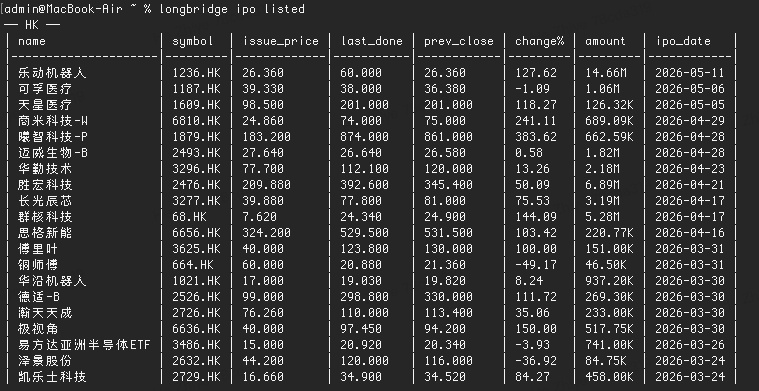
longbridge ipo listed — recently listed (HK + US, one screen)
longbridge ipo subscriptions — HK stocks open for subscription
Why this matters: Cornerstone investors have a 6-month lockup. When well-known long-only funds take cornerstone positions, that's usually a quality signal. The grey market vs. IPO price gap is the market's pre-pricing of the new listing.
2. Earnings drop | financial-statement — Three statements, straight to terminal
Scenario: Earnings just dropped after the close.
You've got 30 minutes to figure out: real growth or accounting magic?
Revenue +30% is easy to spot. But what if accounts receivable is also up 50%?
Goods shipped, cash not collected.
Example commands
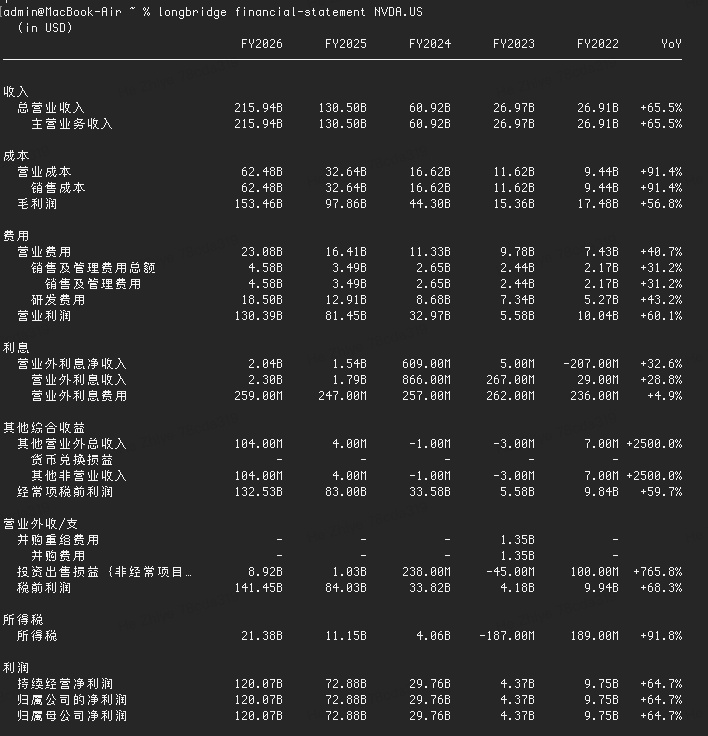
longbridge financial-statement NVDA.US — income statement (default)
longbridge financial-report NVDA.US --latest — key metric summary
Why this matters: The number worth obsessing over is operating cash flow vs. net income.
Stack them side by side and you can call it in 5 seconds.
3. Pricing check | valuation-rank — Is 30x P/E actually expensive?
Scenario: 30x P/E — is that expensive?
It was 30x in 2020 too. But it dropped to 20x in 2024.
So where does today's 30x sit within the industry?
Example commands
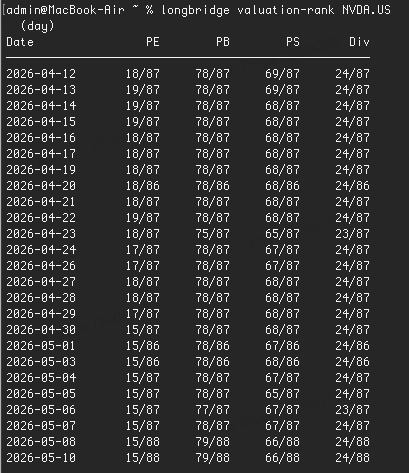
longbridge valuation-rank NVDA.US — current valuation percentile within the industry
longbridge valuation-rank NVDA.US --start 20240101 --end 20260501 — stretch the window, see the trend
Why this matters: Tracking industry valuation percentiles over time reveals how market sentiment and pricing preferences shift across cycles.
4. Sell-side consensus | institution-rating — How analysts are pricing it
Scenario: You've made your own call on valuation. Now you want to see how the sell-side is pricing it.
The reports are scattered across 6 brokers. Pulling them one by one is exhausting.
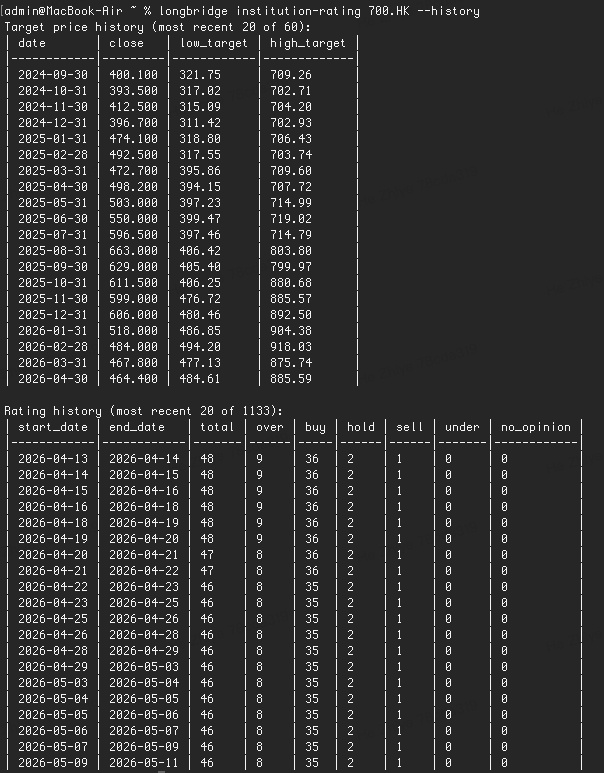
Now? One command gives you the target-price curve over time.
Example commands
longbridge institution-rating 700.HK --history — target price range timeline
longbridge institution-rating 700.HK --industry-rank — industry coverage ranking
Why this matters: You see how analyst target ranges shift over time — not just one static snapshot of today.
More features worth knowing
news search/topic search— keyword search across news and community discussions. Find the past threads you could never dig back to.- Account tools:
bank-cardsfor linked cards,withdrawals / depositsfor cash flow history,portfolio short-marginfor position-level short-margin detail.
🔧 How to install or update
Updating:
In your terminal, run: longbridge update → enter your password. Done.
Want the full changelog for this release? longbridge update --release-notes
If you've already installed Longbridge Skill, the CLI is available automatically.
Installing:
Not set up yet? Here's the fastest way in:
- Tutorial post: [Installation Guide] Step-by-step to install Longbridge Skill + CLI
- Official docs: https://open.longbridge.com/zh-CN/docs/cli
- Mainland China users: https://open.longbridge.cn/docs/cli
One stock. One terminal. One workflow.
From listing (IPO) → earnings (financial-statement) → valuation (valuation-rank) → sell-side (institution-rating) —
✅ The full investment-research chain, now one command at a time, right in your terminal.
Comment challenge 🎯: Pick one stock you've been researching lately. Tell me which new command you most want to try — I'll run it through the CLI and post the output in the comments.
The copyright of this article belongs to the original author/organization.
The views expressed herein are solely those of the author and do not reflect the stance of the platform. The content is intended for investment reference purposes only and shall not be considered as investment advice. Please contact us if you have any questions or suggestions regarding the content services provided by the platform.
