

5 New Capabilities — Research Flow from "Industry Rank" All the Way to "Business Segments"

Researching a stock. What's your pre-open order?
Which sector is strongest today → which sub-segments make up the sector, who's running → pick a name and check institutional ratings → does the print match analyst expectations → which businesses drive the revenue?
These 5 moves — this CLI update fills in each one ✨
This release: 3 new commands + 2 new views / sub-commands.
- 📊 industry-rank — industry gain/loss ranking by market (US/HK/CN/SG) + sector leaders
- 🔍 industry-peers — sector sub-segment tree, full competitive map
- 🎯 institution-rating --views — month-by-month rating trend (buy/hold/sell)
- 💎 financial-report snapshot — AI earnings summary + revenue/EBIT/EPS vs analyst estimates
- 📈 business-segments — revenue broken out by segment, current + historical
MCP ships these in parallel (Tools count now 133). SDK v4.1.0 opens the full set to developers (details at the end).
One overview table below, then 4 worked scenarios.
Full picture of this release
| Category | Command | Type | Function |
| Market view | industry-rank | New command | Industry ranking by market + leaders |
| industry-peers | New command | Sub-segment tree (with YTD) | |
| Sell-side view | institution-rating --views | New view | Monthly rating trend |
| Company view | financial-report snapshot | New sub-command | AI summary + vs consensus |
| business-segments | New command | Segment revenue breakdown (current + history) |
Scenario walkthroughs
1. Pre-open | industry-rank + industry-peers — industry strength + sub-segment tree
Start of the research chain — pre-open, see where strength is sitting.
When to use:
- 9:25 AM pre-open. Which US / HK sector is running today?
- End of earnings season. Which sectors are getting collectively re-rated by analysts?
- Walking into an unfamiliar sector. How many sub-segments, how many names each, YTD up or down?
Commands
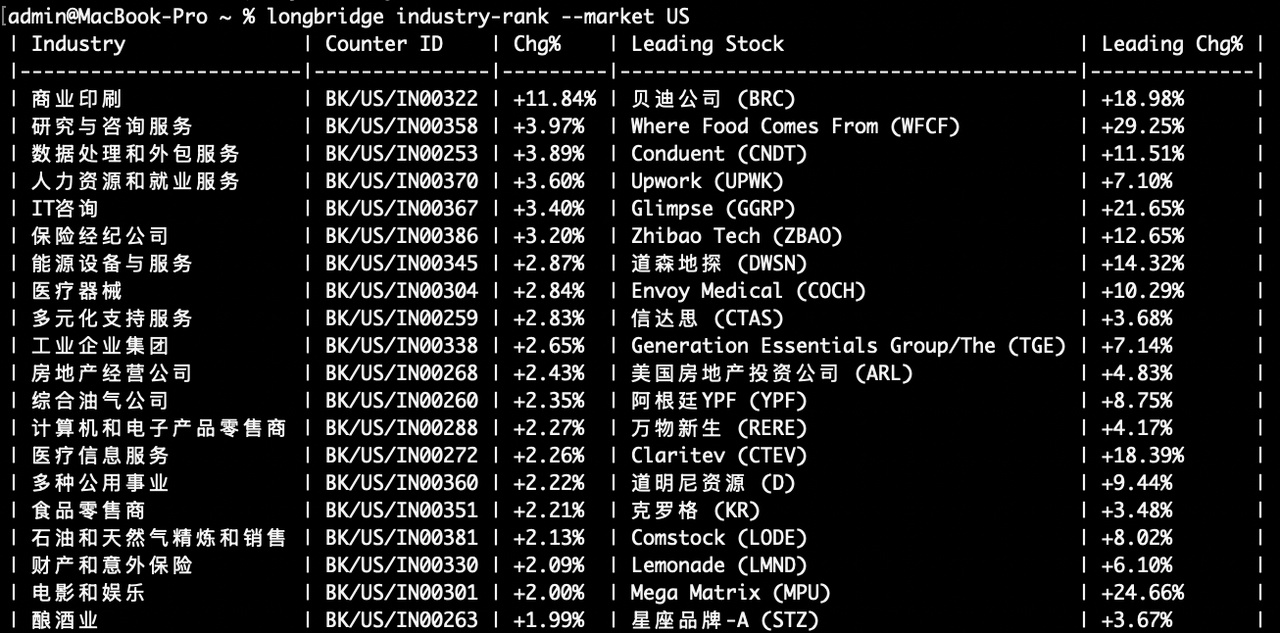
longbridge industry-rank --market US # today's US sector gain/loss ranking
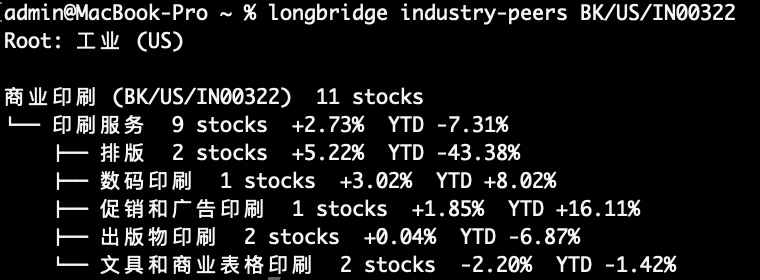
longbridge industry-peers BK/US/IN00322 # drill into a sector for sub-segments
(The sector code BK/US/IN00322 is copy-paste from the industry-rank output — every sector has its own code.)
Why it matters: "Which sector is strongest today → which sub-segment inside is driving → who's the leader" — one drill path.
US sector gain/loss ranking + leaders
Drilling into a sector (commercial printing) for sub-segments
2. Sell-side view | institution-rating --views — how analysts shift month by month
You've picked a name from the leader list or a sub-segment. Next question: how have analysts been changing their minds this year?
When to use:
- Day after earnings — did ratings flip in unison?
- A company transitioning from "growth" to "value" — sell-side usually moves first (ratings shift before price)
- Long-term recap — find the key inflection months in the past 2–3 years
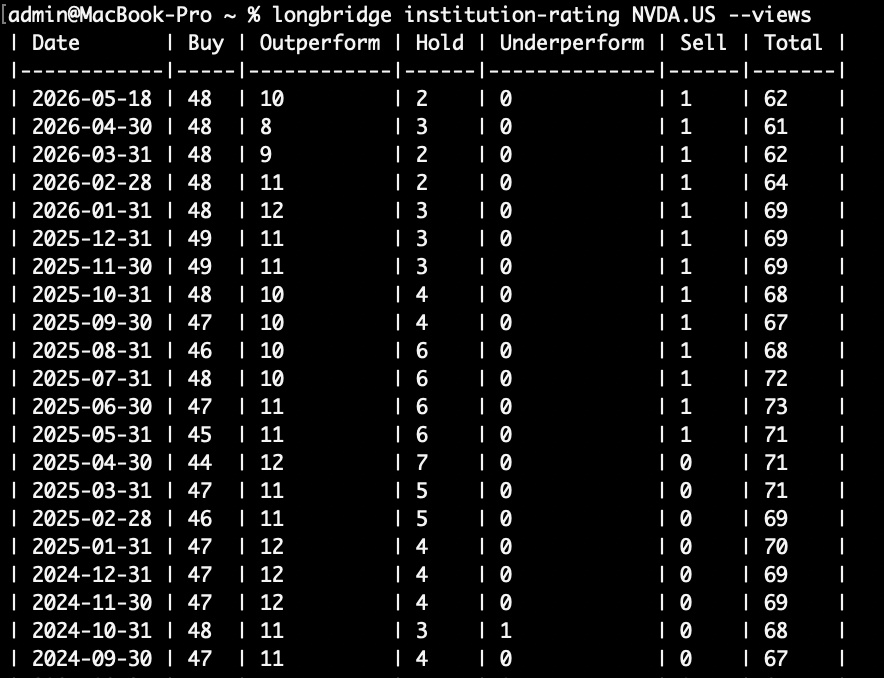
A single snapshot of current ratings is noisy. Buy / hold / sell evolution by month shows the actual months when sell-side flipped collectively.
Commands
longbridge institution-rating NVDA.US --views # NVDA monthly rating evolution
Why it matters: Buy column up + Sell column at zero = sell-side converging. The reverse = divergence. Monthly aggregation is steadier than event-day reads — it cuts short-term noise.
3. Post-earnings | financial-report snapshot — 3 metrics vs consensus + AI summary
Sell-side stance checked. Next: how did the print actually land?
When to use:
- US earnings night (post-market 4 PM / after close) — beat or miss, fast call
- Recapping a past quarter against that quarter's consensus
- Comparing several names in the same sector on how close they printed to consensus
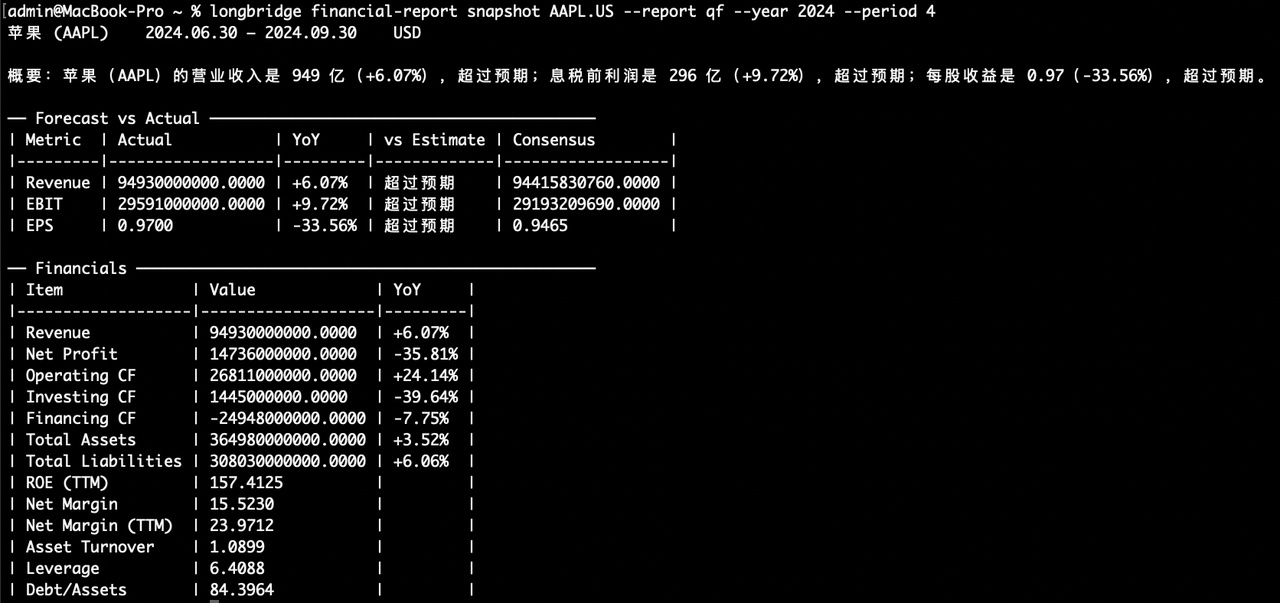
You used to wait for sell-side notes or run your own model to call beat-or-miss. Now AI gives you one paragraph on YoY moves and whether it beat; the Forecast vs Actual table lines up revenue / EBIT / EPS against consensus row by row.
Commands
longbridge financial-report snapshot AAPL.US --report qf --year 2024 --period 4 # AAPL FY2024 Q4 earnings snapshot
Why it matters: AI summary (YoY + beat status) + 3-metric beat/miss vs consensus + key financials YoY — all in one screen.
The latest quarter's consensus may not be back-filled yet — pick a historical quarter for the full feature.
4. Segment breakdown | business-segments — which businesses drive the revenue
Numbers done. Last question: where does this revenue / growth actually come from?
Commands
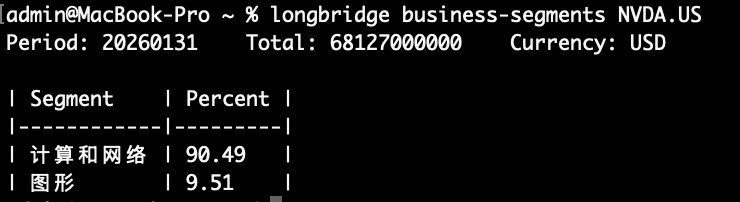
longbridge business-segments NVDA.US # current-period segments
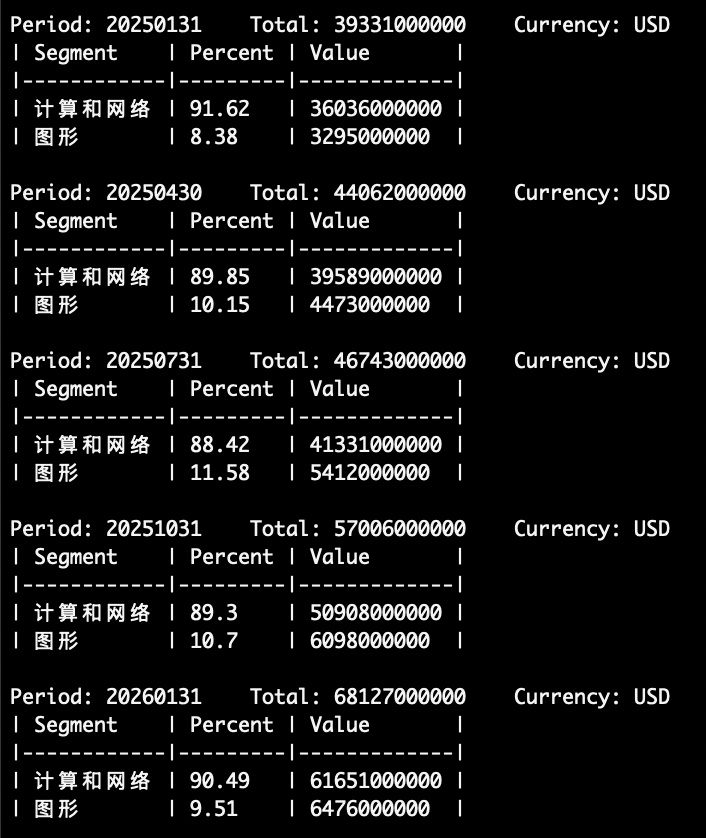
longbridge business-segments NVDA.US --history --report qf # multi-year quarterly segment history
When to use:
- NVDA graphics vs compute & networking mix shift — verify whether the AI transition is actually landing in revenue
- Internet companies — which segment (ads / cloud / gaming / fintech) is growing, which is shrinking
- Concentration risk — is the main segment too dominant, is the company single-business
Why it matters: earnings reports give you total revenue — the real driver hides in segments. --history shows segment mix evolving over years.
$NVIDIA(NVDA.US) current-period segments
$NVIDIA(NVDA.US) quarterly segment history
Also: SDK v4.1.0 ships in parallel
For API developers — this release opens the CLI / MCP capability set to the SDK too:
- 7 new Context types, 66 methods total (Fundamental / Market / Calendar / Portfolio / Alert / DCA / Sharelist)
- QuoteContext gets 4 new methods; ContentContext gets topic-related methods
- Rust SDK supports custom HTTP / WS headers; param types switched to typed enums; currency fields unified to Decimal
SDK docs: https://open.longbridge.com/zh-CN/docs/sdk
🔧 How to install or update
Update: in your terminal, run longbridge update, enter your password. Done.
See what's in this release: longbridge update --release-notes
If Longbridge Skill is installed, the CLI works automatically.
Not installed yet? Quick start:
- Tutorial post: [Installation Guide] Step-by-step to install Longbridge Skill + CLI
- Official docs: https://open.longbridge.com/docs/cli
- Mainland users: https://open.longbridge.cn/docs/cli
Sector strength. Sell-side conviction shift. Earnings beat or miss. Segment-level drivers —
The questions you'd ask top to bottom about one stock, you can now run end to end in the terminal.
Comment challenge 🎯: pick a sector you're researching or a single name, and tell me which new command you want first — we'll run it and post the result in the comments.
The copyright of this article belongs to the original author/organization.
The views expressed herein are solely those of the author and do not reflect the stance of the platform. The content is intended for investment reference purposes only and shall not be considered as investment advice. Please contact us if you have any questions or suggestions regarding the content services provided by the platform.
