
Market heatmap and multi-tab investing
The market heatmap arrives, stocks open in parallel tabs, and shortcuts speed up the whole desk.
Fix for total assets with overnight prices
Overnight:is enabled.
Improvements
- Fixed inconsistent total asset value display across devices when Overnight is enabled.
Open the trade window with a shortcut
Quick Trade Window:Added shortcut keys to open the trade win
New Features
- Quick Trade Window: Added shortcut keys to open the trade window instantly.
- macOS: Cmd+`
- Windows & Linux: Ctrl+`
- Stock Tab Switching: Enabled shortcut keys to switch between stock tabs efficiently.
- macOS: Ctrl+[1-9]
- Windows & Linux: Alt+[1-9]
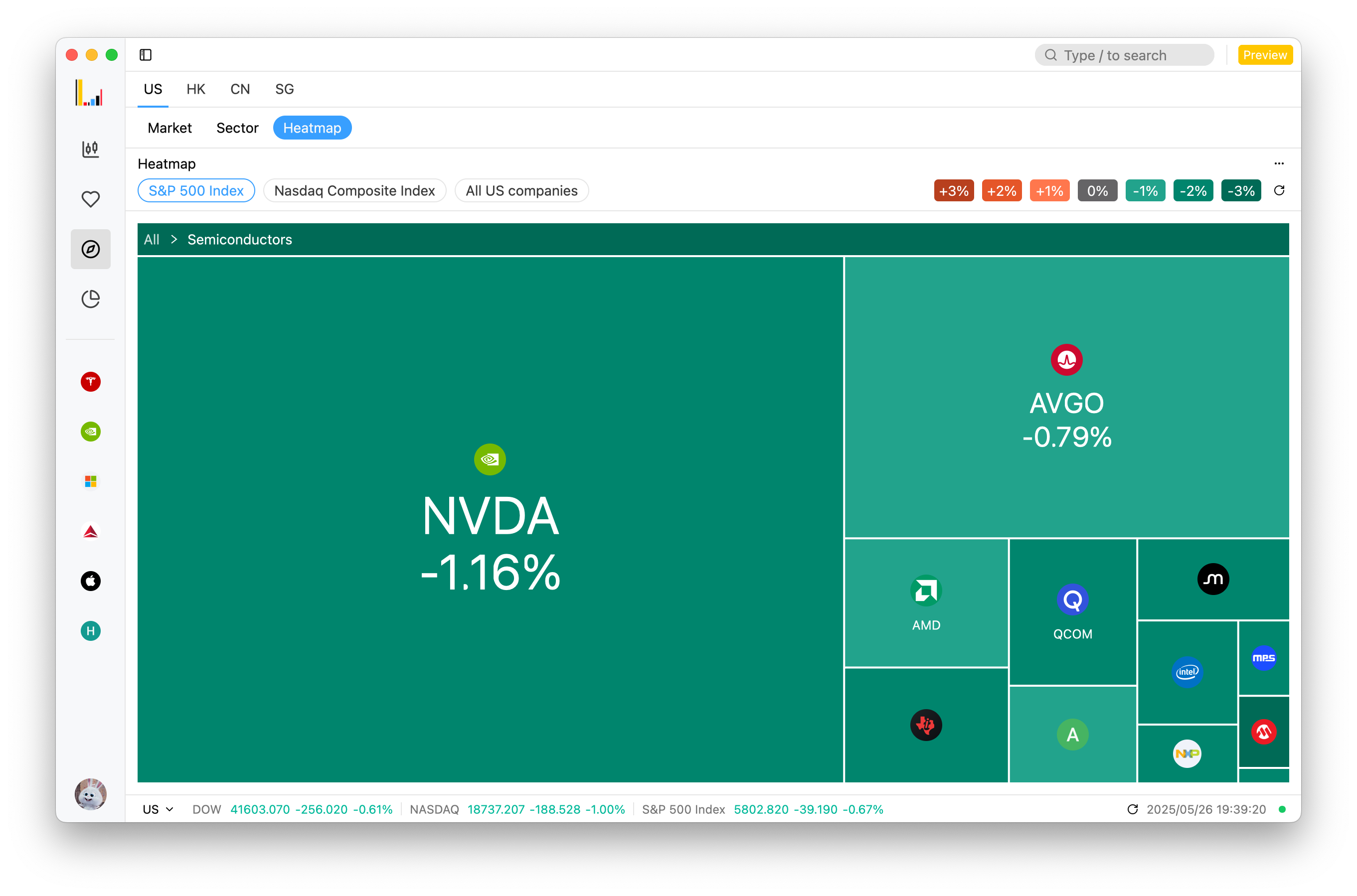
- Market Heatmap: Added detail view to display structured market and stock data, enhancing insights.
- Panel Zoom Toggle: Added shortcut key Shift+Esc to quickly toggle panel zoom and restore, enhancing workspace navigation efficiency.
Improvements
- Optimized rendering mechanism for stock-related charts, boosting performance.
- Supported saving appearance settings, added system theme sync.
- Fixed flickering issues in chart rendering, especially on Windows with AMD graphics, ensuring a smooth visual experience.
Fixes for the Windows verification code and installer
Fixed rendering issues with verification code popup on Windo
Improvements
- Fixed rendering issues with verification code popup on Windows.
- Fixed installation issues with Windows installer.
Market heatmap and multi-tab stock details
Heatmap:Visually display market and individual stock heat, s
New Features
- Heatmap: Visually display market and individual stock heat, supporting custom filtering and real-time dynamic refresh to help users efficiently gain insights into market trends.
- Multi-Tab Stock Details: Support opening stock details pages in multiple tabs for easy comparison, analysis, and seamless switching, enhancing operational efficiency.
- Chart Feature Expansion: Add various types of market charts (such as K-line, line charts, etc.), support more technical indicators and custom configurations to meet diverse analysis needs.
- Auto Update: Introduce automatic update notifications, optimize the update process, and provide in-app release log viewing with multi-language support, further enhancing user experience.
- Stock Logo: Add a feature to display stock logos, visually presenting unique identifiers for each stock in detail pages, lists, and trading interfaces, improving recognition and visual experience.
- Trading Window: Introduce a new trading window design, providing a dedicated trading interface for seamless trading experience.
Improvements
- Refactor the login interface, optimize layout, animation effects, and interaction logic to enhance visual appeal and operational smoothness.
- Optimize the user menu list by adding account status, account ID, and other information for quick access to key data.
- Optimize the presentation of data in the asset module, standardizing numerical formats, units, and decimal display logic to improve data readability.
- Improve chart zooming functionality, optimize gesture sensitivity and response speed to enhance user operation experience.
- Unify the height and layout of trading windows, optimizing cross-platform display consistency.
- Optimize text style and color adaptation of charts during theme switching, ensuring content clarity in both light and dark modes.
- Optimize default chart interface settings to automatically adapt to user theme preferences, improving the first-time user experience.
- Optimize the handling logic of complex mouse events on K-line charts, enhancing interaction response speed and accuracy.
- Redesign the layout of trading detail fields to highlight key information and improve information retrieval efficiency.
- Add a rule allowing short selling only in the US market, enhancing trading compliance.
- Optimize the refresh mechanism of the order details history table, improving data loading speed and stability.
- Move the language switching feature from the title bar to the user menu, optimizing interaction logic and interface smoothness.