
New brand colors and daily trade stats
A new brand theme color, a daily trading panel on assets, and stock layouts that sync across tabs.
Fix for logout failures on Linux and Windows
v0.10.2
Fixed issue where logout failed on Linux or Windows systems.
Optimizations
- Fixed issue where logout failed on Linux or Windows systems.
- Fixed issue where syncing theme appearance caused abnormal exit on Linux systems.
Fix for K-line data after switching price adjustment
v0.10.1
Fixed an issue where historical data might fail to load corr
Optimizations
- Fixed an issue where historical data might fail to load correctly after switching adjustment settings in K-line charts.
- Fixed an issue where filter options were not cleared after clicking “Clear” in the buy/sell direction filter for today’s orders and historical orders.
New brand theme colors and daily trade stats
v0.10.0
Theme:Introduced new brand theme colors, making the app look
New features
- Theme: Introduced new brand theme colors, making the app look more visually appealing.
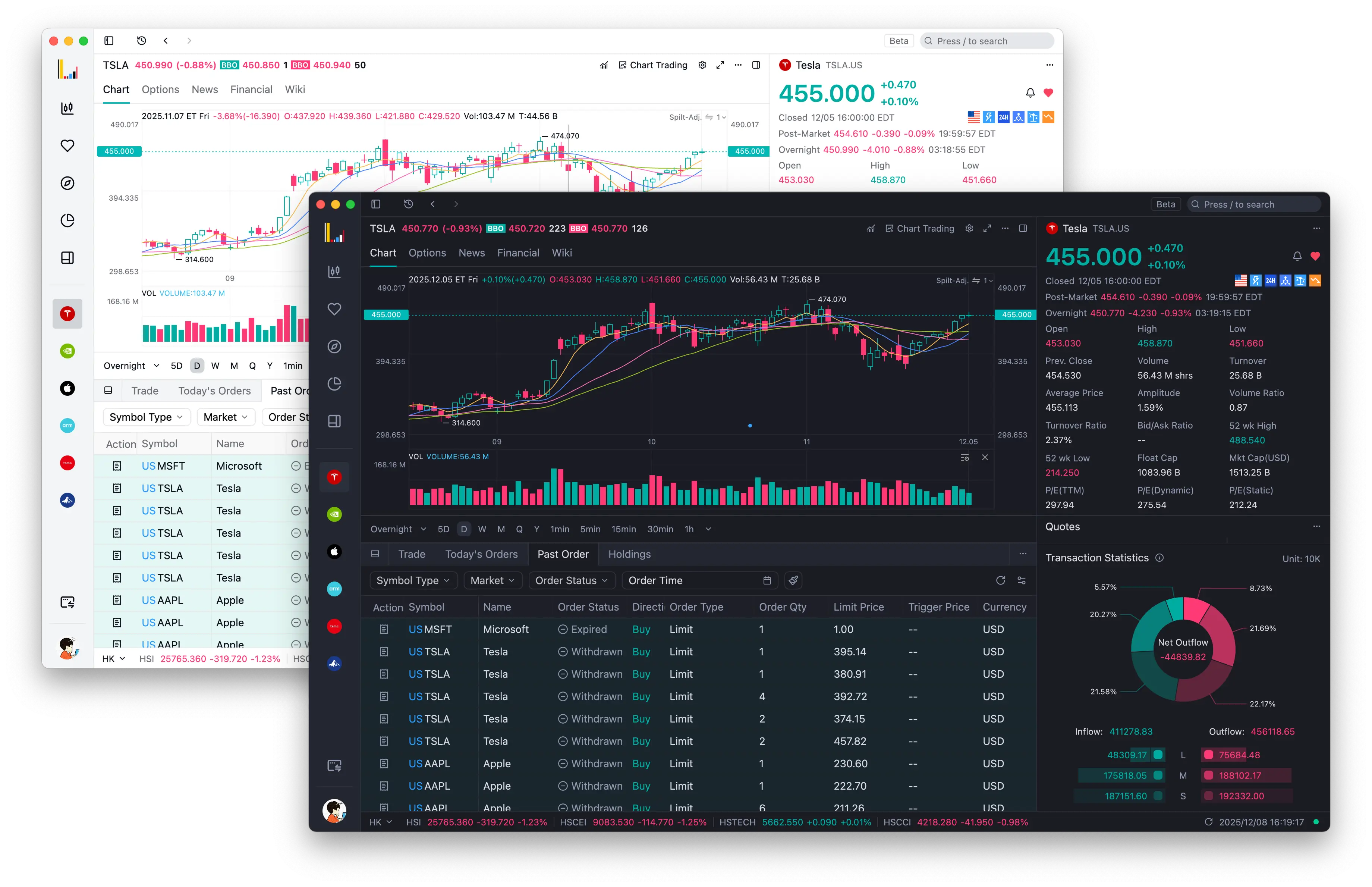
Theme: Default Light / Default Dark
- Portfolio: Added “Today’s Statistics” panel in the Portfolio tab, helping you better understand your daily profit and loss data.
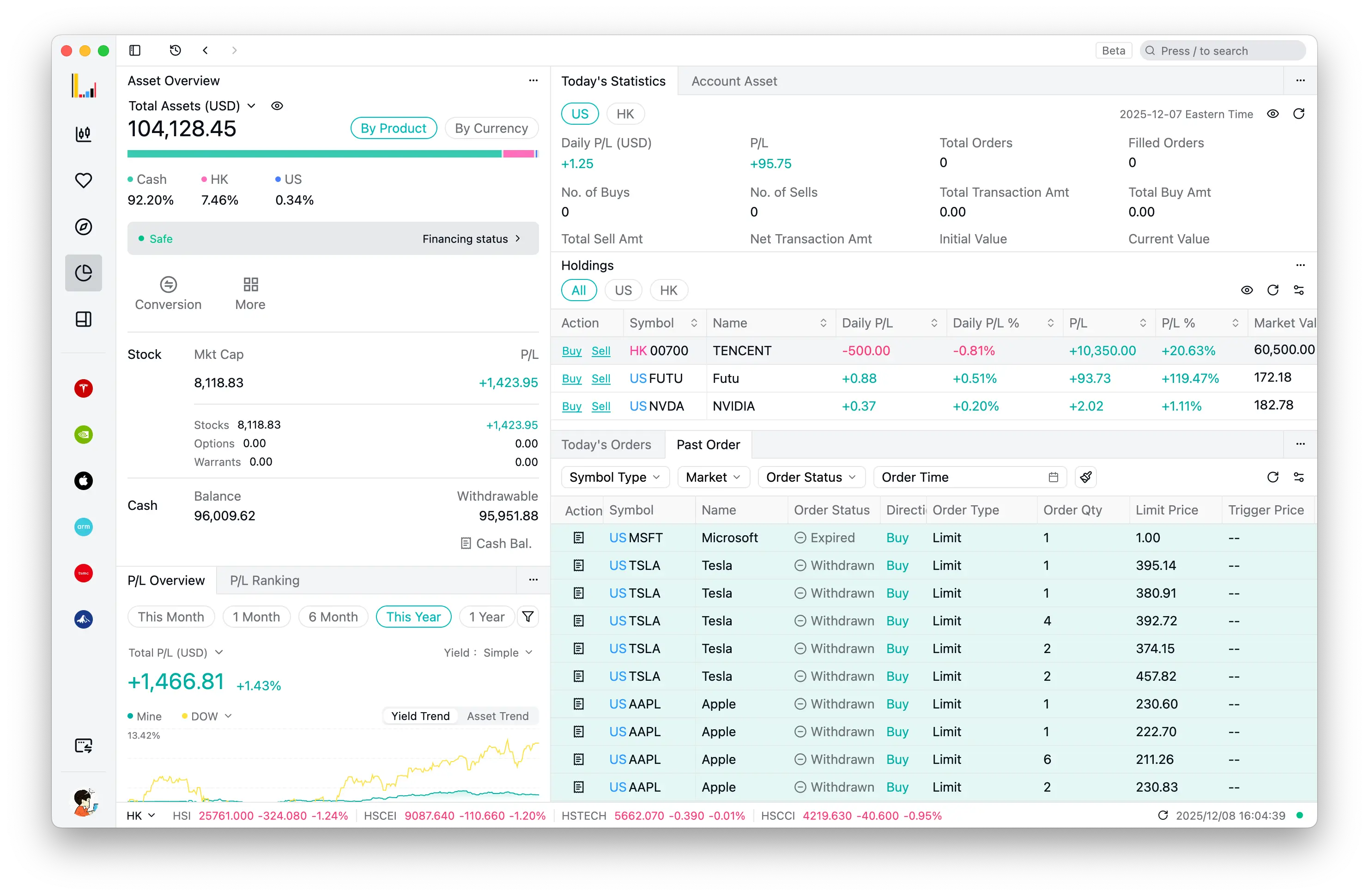
- Stock: Stock tab now syncs layouts to other stock tabs, allowing you to maintain a consistent browsing experience across different stock tabs.
Optimizations
Theme
- Improved theme mode change logic, supporting light/dark theme toggle within the selected theme mode.
- Fixed incorrect heatmap colors in the default theme.
Chart
- Improved chart settings interface with better interaction styles for a more intuitive configuration experience.
- Improved data timestamp reset logic when switching time ranges.
- Improved notification mechanism after chart main data is loaded.
- Improved timeshare chart background opacity details.
- Fixed issue where right-clicking in charts had no response.
- Fixed issue where drawing shapes were lost when loading more data.
Trading
- Improved order modification dialog interaction in Today’s Orders panel, now displayed as an independent window with free drag-and-drop support.
- Improved trading window height and adjusted panel layout styles.
- Fixed content flickering issue when bid/ask quotes changed.
- Fixed issues related to attached order cancellation and modification.
- Fixed incorrect balance information preview when replacing orders.
- Fixed duplicate error notifications for orders.
Login
- Added search functionality in country/region list for quick location, with alphabetical grouping support.
- Fixed update status error when login window is closed.
Stock
- Improved stock wiki section styles and padding for neater content presentation.
- Improved stock news item display, fixing potential overflow issues.
Others
- Added “Reset layout” option in tab context menu for quick restoration of default tab layout.
- Improved double-click selection interaction in tables such as Holdings/Past Orders/Today’s Orders to prevent accidental cell selection.
- Improved layout of “Market” - “Sector” tab page, removing trading panel and keeping only essential components for better focus on data display and improved user experience.
Drag the amend-order window anywhere, clearer chart settings
v0.10.0-preview.1Preview
The amend-order dialog in Today's Orders opens as a draggable window; Today's Statistics shows amounts by market and currency, and right-click on charts works again.
Optimizations
Chart
- Optimized the chart settings window, providing a more intuitive chart configuration experience.
- Fixed the issue where right-click on the chart had no response.
Trade
- Optimized the order modification modal in the Today’s Orders panel to display as a window, supporting free drag operations.
- Optimized the transaction amount display logic in the Today’s Trades statistics panel, making the amount display more reasonable for different markets and region.
- Fixed the issue where balance information preview was incorrect when modifying orders.
- Fixed the issue where content flickered when there were quote changes in the bid-ask panel.
Theme
- Optimized the color scheme of the default theme and other themes, making the interface look more beautiful.
- Optimized the background image of the login window, enhancing the visual experience during user login.
Today's Statistics panel, plus trading in a separate window
v0.10.0-preview.0Preview
The Today's Statistics panel in the portfolio tab gives a clear view of daily profit and loss; the trading window now opens as a separate window for multi-screen setups.
New Features
- Portfolio: Added “Today’s Statistics” panel to the portfolio tab, providing a clearer overview of daily profit and loss data.
Optimizations
Trading
- Optimized trading window display from modal to independent window mode, offering more flexible multi-screen operation experience.
- Optimized post-order status notification mechanism to ensure reminders only occur after trading is activated.
- Fixed duplicate order error notifications to avoid misleading repeated alerts.
- Fixed issue where clearing stock codes in order filters was not working.
Login
- Optimized country/region selection list search feature in login window, making it more convenient to find and select countries or regions.
- Fixed app update status error when login window is closed.
Others
- Optimized intraday chart background transparency details, enhancing visual effects.
- Optimized custom workspace tab initialization timing, improving loading speed for custom workspaces.
- Added success and failure status icons during app updates, making update progress more intuitive.
- Fixed issue where market index quote details were not reloaded after network reconnection, ensuring data remains up-to-date.