
Attached orders and chart personalization
Trading gains attached orders, charts follow your own settings, and positions sort by market status.
Attached orders and chart personalization
v0.6.0
Trade:Added support for Attach orders to accommodate more tr
New features
- Trade: Added support for Attach orders to accommodate more trading scenarios.
- Charts: Introduced personalized chart settings to enhance flexibility in user-defined visualizations.
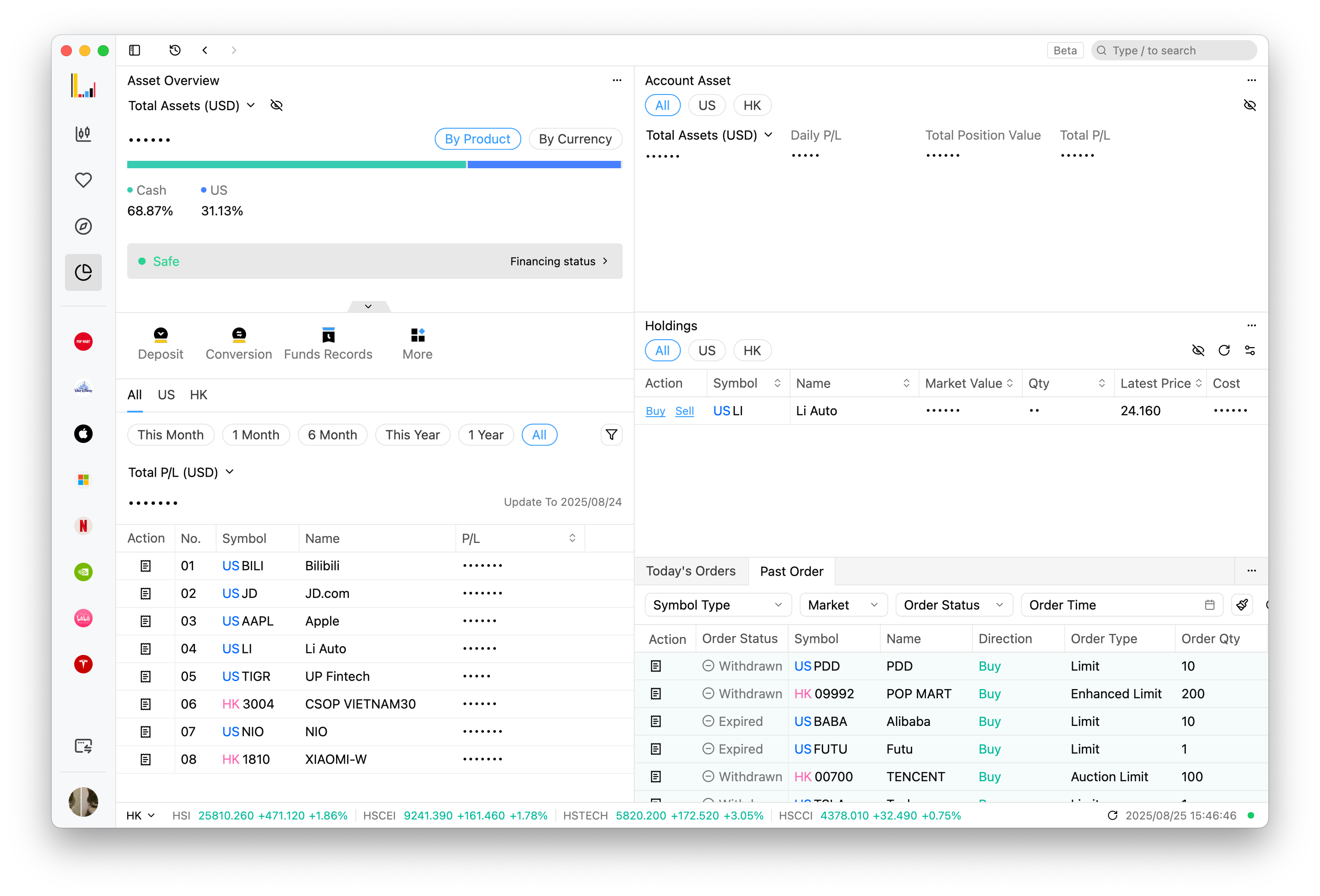
- Holdings: Added automatic sorting functionality based on market status and optimized the default column order in table headers to help users focus more intuitively on asset overview. Also added an All option for convenient viewing of data from different markets in the same list.
Improvements
- Enhanced the progress display interaction during app updates for clearer feedback.
- Optimized recording of browsing history when switching market tabs for quick return.
- Improved login status management to reduce unnecessary logout prompts.
- Enhanced display of order rejection reasons for clearer and more accurate feedback.
- Optimized layout update notifications, prompting only once per category to minimize disruption.
- Improved interaction for unified option chain header column settings.
- Optimized trading price input validation logic to align with the minimum price change unit.
- Improved empty state display for tick-by-tick data, providing clearer interface cues when no data is available.
- Enhanced heatmap with additional color levels and refined zoning.
- Optimized default display order of columns in the position profit/loss table for better information readability.
- Improved display of selected custom dates when replacing orders.
- Unified display format for position fields.
- Enhanced display of underlying assets for position option types.
- Fixed an issue where the last data point in the cash flow chart could not be selected.
- Resolved a calculation error in exchange rate conversion during quoting to avoid discrepancies.
- Corrected missing timeline in quote charts.
- Fixed an issue on Linux systems where the deposit popup was unresponsive.
- Resolved a potential app crash issue on Windows systems.
- Fixed overlapping of the X-axis with lines in real-time streaming market charts.
- Corrected missing last bar and non-display of zero-value bars in historical market charts.
- Fixed incorrect display of some fields in order details.
- Resolved an issue where the latest price in the price selection list of the trading panel was not centered.
Holdings sort by market status and show all markets at once
v0.6.0-preview.3Preview
Holdings are sorted by market status, an All option shows every market in one list, and there are fewer unnecessary logout prompts.
New Features
- Holdings: Added automatic sorting functionality based on market status and optimized the default column order in table headers to help users focus more intuitively on asset overview. Also added an All option for convenient viewing of data from different markets in the same list.
Improvements
- Fixed an issue where the last data point in the cash flow chart could not be selected.
- Fixed overlapping of the X-axis with lines in real-time streaming market charts.
- Corrected missing last bar and non-display of zero-value bars in historical market charts.
- Fixed incorrect display of some fields in order details to ensure data accuracy.
- Improved display of selected custom dates when replacing orders.
- Fixed an issue where the latest price in the price selection list of the trading panel was not centered.
- Optimized recording of browsing history when switching market tabs for quick return.
- Improved login status management to reduce unnecessary logout prompts.
Fixed the app unexpectedly quitting on Windows
v0.6.0-preview.2Preview
The app no longer quits unexpectedly on Windows.
Optimizations
- Fixed a potential crash issue on Windows systems to improve application stability.
Chart customization, plus OTC derivatives on the assets page
v0.6.0-preview.1Preview
Charts can be customized, the assets page shows OTC derivatives and has an All filter, and the heatmap has finer color levels.
New Features
- Chart: Added new chart customization options, enabling users to tailor visualizations to their preferences for enhanced flexibility.
- Asset: Introduced display of over-the-counter derivatives market information, providing a comprehensive view of asset details.
Improvements
- Enhanced progress display during application updates, offering clearer feedback for a smoother user experience.
- Improved real-time user status refresh mechanism, ensuring consistent state synchronization across multiple clients.
- Refined chart notifications to reduce unnecessary alerts, improving focus and usability.
- Optimized empty state display for tick-by-tick data, providing clearer interface cues when no data is available.
- Improved transaction list styling and enhanced attribute functionality, increasing readability and operational efficiency.
- Adjusted the width of the history popup menu for better visual consistency.
- Enhanced the user assets page with an All filter option, simplifying overall asset review.
- Upgraded heatmap with additional color gradients and refined zoning, improving data visualization clarity.
- Strengthened transaction amount validation rules to prevent invalid inputs, ensuring data accuracy.
- Refined the order details popup styling and fixed display state issues, enhancing interface clarity.
- Set
Noto Sansas the fallback font, ensuring better cross-device compatibility. - Adjusted the right margin of the window title bar for a more balanced layout.
- Fixed missing timeline in the quote chart, ensuring complete market data representation.
Attached orders when placing trades
v0.6.0-preview.0Preview
Orders can carry attached orders, rejection reasons are clearer, and theme changes are kept.
New Features
- Attached Orders: Added support for attached orders in trading, enabling broader order execution scenarios.
Improvements
- Improved rejection reason display for orders, offering clearer and more accurate feedback.
- Optimized layout update notifications to appear only once per layout category, reducing interruptions.
- Unified the options chain settings into a single table-style popup for more intuitive configuration.
- Enhanced net flow label display for better information clarity.
- Adjusted price input validation logic to align with minimum price increment, ensuring input accuracy.
- Fixed errors in quote conversion details to maintain data correctness.
- Resolved exchange rate calculation issues in quote conversion to avoid deviations.
- Fixed overlapping table borders to improve visual clarity.
- Fixed unresponsive deposit dialog on Linux systems, enhancing cross-platform compatibility.
- Fixed theme changes not saving to local storage, ensuring user preferences are retained.