
Custom workspace layouts
A brand-new free-form layout with 20+ themes, plus multi-leg option strategies and full financial statements.
Fix for unexpected app exits
Fixed some issues that caused the app to exit unexpectedly i
Improvements
- Fixed some issues that caused the app to exit unexpectedly in some scenarios.
Interaction polish across pages
Improved interaction experience on several pages.
Improvements
- Improved interaction experience on several pages.
Custom workspace layouts
Custom workspace:This shipped introduces a brand-new custom
New features
-
Custom workspace: This shipped introduces a brand-new custom workspace feature, allowing you to Create, Manage and Update your workspace more flexibly.
-
Getting started
- Start from a blank layout — Drag, Resize or Remove widgets to freely create and custom your workspace.
- Start from one of our preset templates to meet different trading needs.
- Start from a blank layout — Drag, Resize or Remove widgets to freely create and custom your workspace.
-
Tab management: Create, Delete, Rename, Sort or Open tab in new window.
-
Grouping widgets: You can assign multiple widget into the same or different groups. widgets in the same group will automatically synchronize when switching stocks.
-
Rich widgets support: Choose from widgets in categories like Trading, Stocks and Markets to suit your analysis and trading needs.
-
-
Options: Added support for combination option strategies, enabling more complex trading strategies.
-
Stocks: Added access to more financial data, including key indicators, income statements, balance sheets, and cash flow statements for a comprehensive financial analysis.
-
Themes: This shipped includes 20+ preset themes. You can pick your favorite theme apply it across the entire app.
- Choose your favorite theme
- More themes to explore
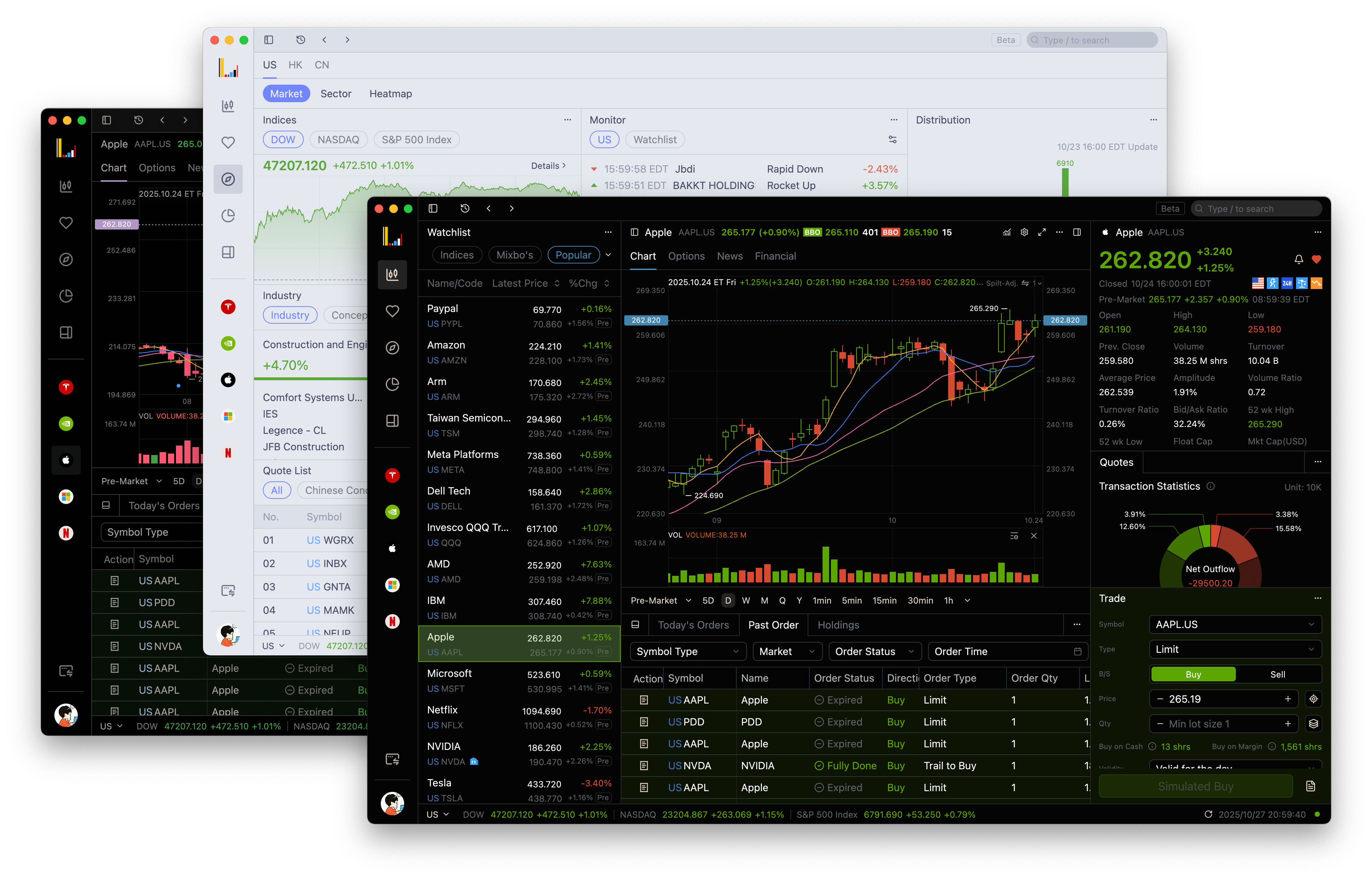
- Choose your favorite theme
-
Trading: Added responsive layouts for trading panel. They now adapt to different window sizes and support horizontal alignment for better layout optimization.
Optimizations
- Improved order list update sequence and display logic for more accurate order status.
- Enhanced precision and unit display for virtual asset fields.
- Updated asset holdings with ETF support and refined UI styling.
- Improved option strategy list and field precision display.
- Optimized trading password error message style.
- Fixed logo clipping on quote details page.
- Reduced latency in bid/ask price and volume updates.
- Refined gradient background for total assets chart.
- Adjusted market tab display on asset overview panel based on regional preferences.
- Added theme-adaptive color support for action icons in the asset overview panel.
- Streamlined app auto-update process to reduce waiting time.
- Fixed missing fields in order modification popup.
- Fixed incorrect order sequence after order push.
- Fixed incorrect position in sell orders during modification.
- Fixed issue where trading price input field did not auto-fill market price.
- Fixed incorrect margin usage when margin was negative.
- Fixed empty content in short-selling chart when no data available.
- Fixed stock name overflow in global history list.
- Fixed mismatch between expired options and search results in global search.
- Fixed missing withdrawal icon in asset overview panel.
- Fixed app crash issue when using feedback on login page.
- Fixed sub-window merge failure on first app launch.
- Fixed occasional app crash caused by password field.
- Fixed high memory usage in some cases.
- Fixed multiple crash issues on Windows platform under certain conditions.
Switch preset themes from the user menu
Pick and switch preset themes from the user menu; the price input now auto-fills the market price, and charts refresh on time.
New Features
- Themes: You can now select and switch preset themes directly from the user menu within the application.
Optimizations
- Fixed issues with the selectable and disabled states of checkboxes in table settings.
- Resolved missing placeholder display when short selling data is unavailable.
- Fixed the issue where the price input box did not auto-fill market prices.
- Addressed the missing icon for the withdrawal function on the assets interface.
- Corrected restriction prompts for unsupported viewing and trading of certain positions.
- Fixed incomplete display of logos on individual stock detail pages.
- Resolved the issue of chart modules not refreshing promptly.
- Fixed mouse gesture errors on charts when opening the trade history popup.
- Improved alignment issues in the options chain table for cleaner display.
Market panel loads without jitter, financials easier to read
The market panel no longer shifts around while loading, the financial statements list is easier to read, and the feedback button on the login page no longer crashes the app.
Optimizations
- Improved the loading experience of the market tab, resolving layout jitter during data loading to ensure a smoother and more stable interface.
- Enhanced the display style of the financial statements list, making information presentation clearer and easier to read.
- Optimized the display of stock names in the global history list, addressing overflow issues for long names.
- Fixed an issue where the app would exit unexpectedly when using the feedback button on the login page.
- Resolved an issue where the interface could not be scrolled in certain scenarios.
Company financials, from key metrics to cash flow
Key metrics, income statements, balance sheets, and cash flow statements are now available for each stock; market overview display errors are fixed.
New Features
- Financial: Added support for viewing key metrics, income statements, balance sheets, and cash flow statements, enabling comprehensive analysis of company financial health.
Optimizations
- Improved the loading style of the market overview; visual effects are better when guide information is collapsed.
- Fixed an issue where the market overview chart rendered incorrectly when only buy or sell data was available.
- Corrected the position of strike price indices in options strategies.
- Fixed delayed updates for BBO prices and volumes, and resolved subscription limit errors in market overviews when stocks were opened in multiple tabs.
- Addressed an issue where incorrect rejection reasons were displayed in order details.
- Fixed the failure to refresh estimated buy limits when orders were pushed.
- Resolved an app crash issue when entering Chinese content in SMS verification or password input fields.
An error message appears when orders fail to load
An error message appears when orders fail to load, and the global history list and order table are aligned more neatly.
Optimizations
- Enhanced the style and alignment of global history items for improved visual experience.
- Refined operation filtering options and adjusted alignment styles in the operation column, enhancing the usability of the order table.
- Fixed an issue where error messages were not displayed when order retrieval failed, ensuring better issue identification.
US stocks show 60-level market depth
US stocks show a 60-level depth list, market tabs on the assets page follow your regional preference, and order quantity has an input limit.
New Features
- US Market: Supported 60-level depth chart and list for US market stocks.
Improvements
- Updated asset chart with refined linear gradient background and dynamic theme-driven icons.
- Adjusted market category tabs on the asset page to align with user’s regional preferences.
- Refined quick trade form layout to be responsive and updated trigger buttons for better usability.
- Limited maximum value for quantity input to prevent abnormal orders.
- Improved margin calculation logic when account balance is negative, ensuring accuracy.
- Enhanced trade authentication flow with better pre-check and improved error message display.
- Aligned certain columns in the order table to the right for improved readability.
- Fixed crash issues on Windows platform in certain edge cases.