
How to transfer stocks from Tiger Brokers to Longbridge? — Integrated account
The process of transferring stocks from Tiger Brokers to Longbridge mainly involves two steps: submitting a transfer-in request to Longbridge and submitting a transfer-out request to Tiger Brokers (integrated account). Below are the detailed descriptions for these two steps.
Note: The following guidelines are for reference only. For the specific transfer process, please contact your Tiger Brokers account manager or Tiger Brokers customer service to confirm. They will provide a corresponding transfer plan based on your account situation.
1. Submitting a transfer-in request to Longbridge
Step 1. Go to the Longbridge App > Portfolio > Transfer to submit a transfer-in application. If you have already deposited funds, select Portfolio > More > Share Transfer-In.
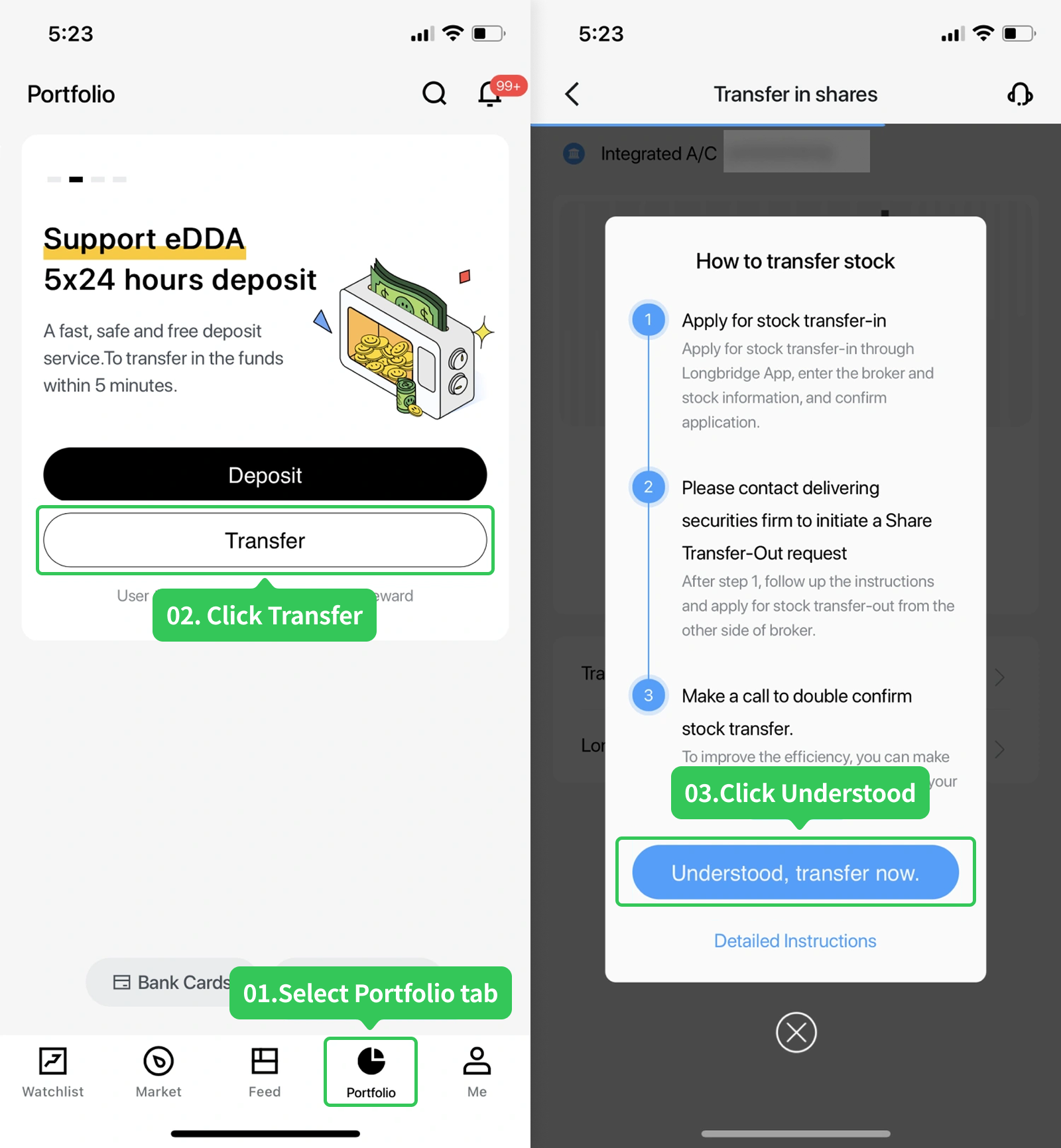
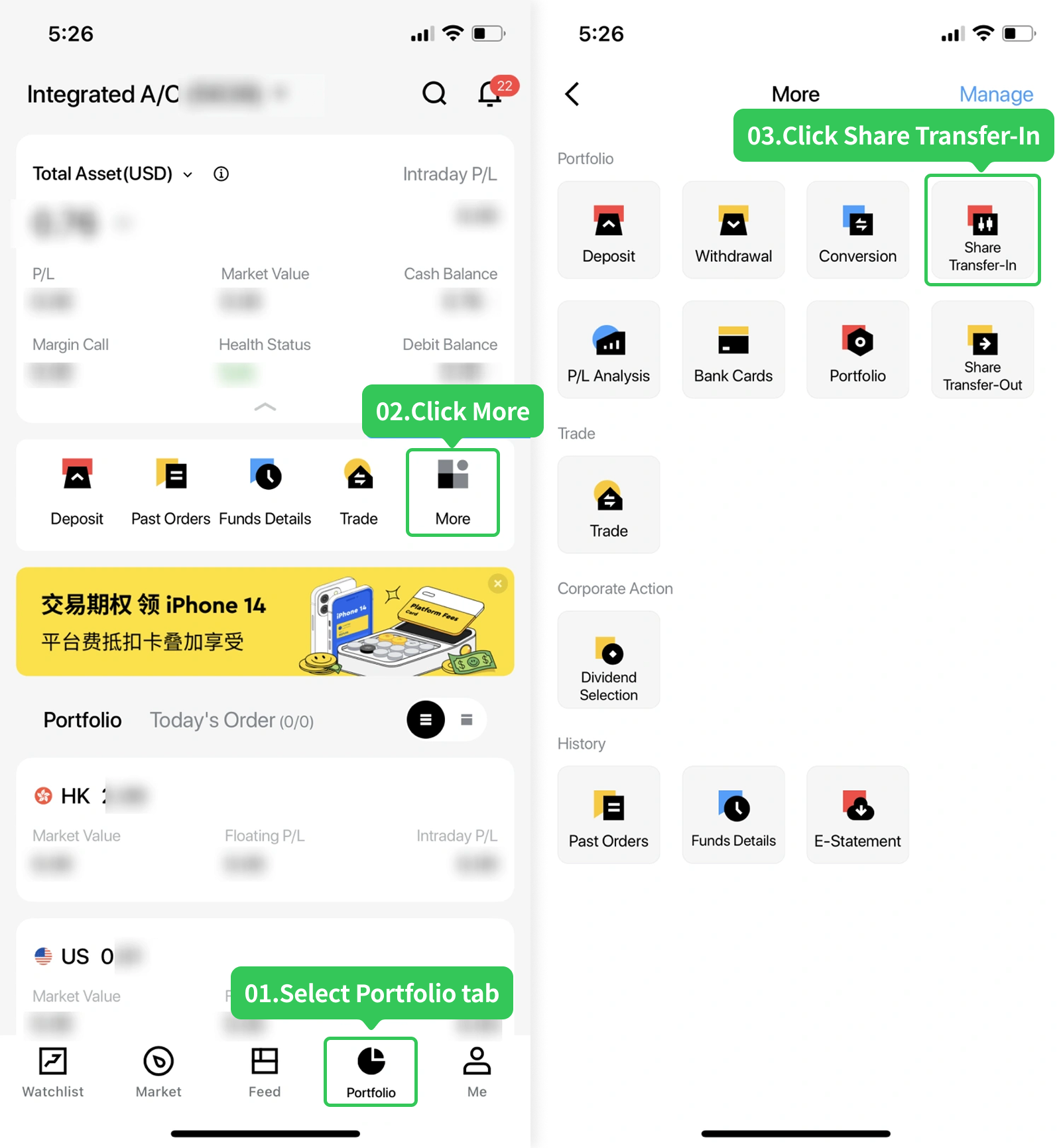
Step 2. Fill in the transfer details and confirm transfer-out stock information. Select Tiger Brokers as the transfer-out broker, enter the account holder's name and account number, click Next, and fill in the stock information.
Please note: Longbridge now supports entering the cost price per share (optional).
- If not entered: The cost price per share will be calculated based on the closing price on the day the transfer is completed.
- If you need to enter: Please enter the cost price you actually want to display. After the transfer is completed, profits and losses will be calculated based on the cost price you entered.
- The cost price cannot be modified once it is entered. If you have any questions, please contact customer service.
Step 3. Confirm stock transfer details and submit the transfer application.
2. Confirming the account type of Tiger Brokers
Tiger Brokers has two account types: global accounts and integrated accounts. Their processes for submitting transfer-out requests are different. Please check which account type your stocks are held in.
Log in to Tiger Brokers, click My > Tiger Account, and check the account type.
If you have a global account, click here to view relevant instructions.
3. Submitting a transfer-out request to Tiger Brokers (integrated account)
Contact Tiger Brokers' telephone/online customer service to submit a stock transfer application. Since the process for submitting transfer-out requests may vary across brokers, please refer to the requirements of the other broker for details.
Click here to see Longbridge information for stock transfer-in.
Notes:
- Stock transfers between different brokers are limited to transfers between accounts under the same name.
- Fees for stock transfer: Longbridge does not charge any fees. Fees may be charged by the broker who transfers the stock out.
- Time required for stock transfer: The processing time depends on the other broker. Once the other broker transfers the stocks out, Longbridge will deposit them into your account within 1–2 working days.
Disclosures
This article is for reference only. The required confirmation information shall be subject to the actual display. The information in the guide above is for illustrative purposes only.
This article does not constitute any investment advice.
Office hours of HK Hotline and Whatsapp: 9:00 - 18:00 * (GMT+8) on trading days
Office hours of Global Hotline: Trading days 24 hours; Non-trading days 9:00 - 18:00 * (GMT+8)
Outside of the above service hours, if you have any questions, please contact our online customer service.
Office hours of online customer service:
© 2026 Longbridge
* Offers are subject to terms and conditions

A licensed corporation recognized by the SFC (CE No. BPX066). Holder of License Types 1 (Dealing in Securities), 2 (Dealing in Futures Contracts), 4 (Advising on Securities) and 9 (Asset Management). Also a registered HKEX participant and HKSCC participant.

Registered with the Monetary Authority of Singapore (MAS), Long Bridge Securities Pte. Ltd. is a Capital Markets Services Licence holder and Exempt Financial Adviser (Licence No. CMS101211).

A broker dealer registered with the Securities and Exchange Commission (SEC)(CRD: 314519/SEC: 8-70711), a member of the Financial Industry Regulatory Authority (FINRA) and Securities Investor Protection Corporation (SIPC).

New Zealand registered Financial Service Provider (FSP number: FS600050) and a member of the Financial Dispute Resolution Scheme, a New Zealand independent dispute resolution service provider.
The content and materials published here on this website is for general information only and should not be regarded or deemed to be an offer, invitation, or solicitation, recommendation or advice to buy, sell, subscribe or dispose of any investment products or financial services. It does not take into account the specific personal circumstances, investment objectives, financial situation or particular needs of a person and may be subject to change without notice.
Please consult your financial or other professional advisers if you are unsure about the information contained herein. Investments involve risks. Be aware that investments may increase or decrease in value and that past performance is no guarantee of future returns, you may not get back the amount originally invested. You should not make any investment decision based on this content alone.