How to complete eDDA authorization for deposits? (ICBC (Asia))

Electronic Direct Debit Authorization (eDDA) is a value-added service of the Faster Payment System (FPS) launched by the Hong Kong Monetary Authority. Through this service, you can authorize Longbridge to transfer HKD funds from your designated Hong Kong bank account to your securities account. After completing the authorization and binding process, you can directly initiate deposit instructions through the Longbridge App, enabling quick direct debit and deposits. After reading this article, you will understand the operational process and related precautions of eDDA for ICBC (Asia).

1. Authorization via online banking

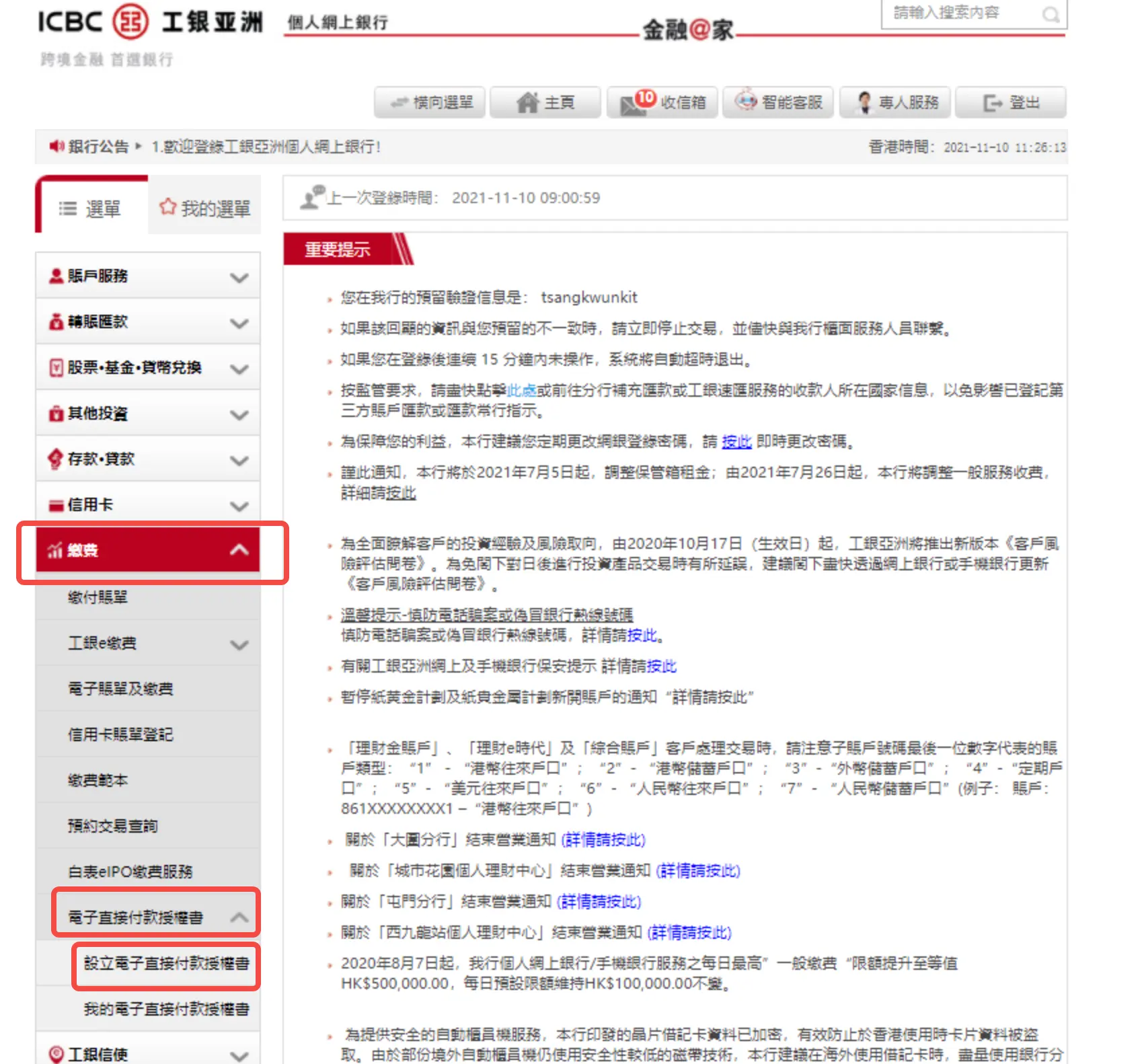
Step 1. Log in to ICBC (Asia) Bank Website and select Bill Payment > eDDA > Set up Electronic Direct Debit Authorization.

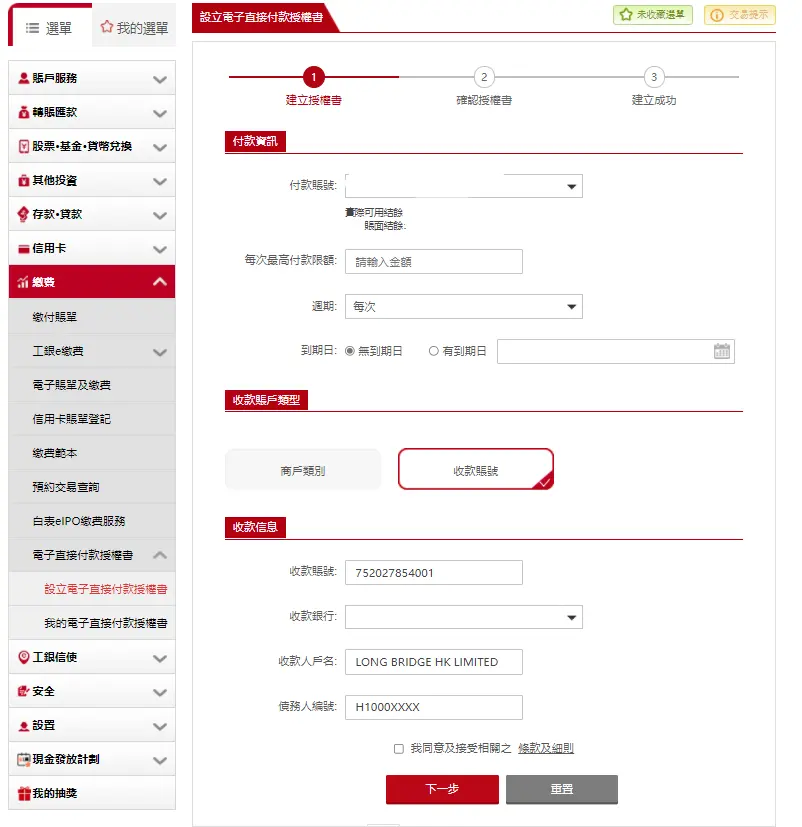
Step 2. Set up eDDA. Fill in the following information and agree to the terms and conditions. Click Next.

  1. Payment information
    • Payment account: Select the bank account for payment.
    • Maximum amount: Enter an amount based on your needs. It is recommended that the input limit should not exceed HKD 100,000. If the amount exceeds HKD 100,000, you will need to download the automatic transfer authorization form, fill it out, and send it to the address specified in the form.
    • Expiry date: Please set it according to your needs. It is recommended not to set an expiry date.
  2. Type of beneficiary account
    • Type of beneficiary account: Select a beneficiary account.
  3. Beneficiary information
    • Beneficiary account No.: 752027854001
    • Beneficiary name: Long Bridge HK Limited
    • Debtor code: Enter your Longbridge account number, i.e., the payer number shown on the Longbridge authorization guide page.
    • Beneficiary bank: 024-Hang Seng Bank Limited

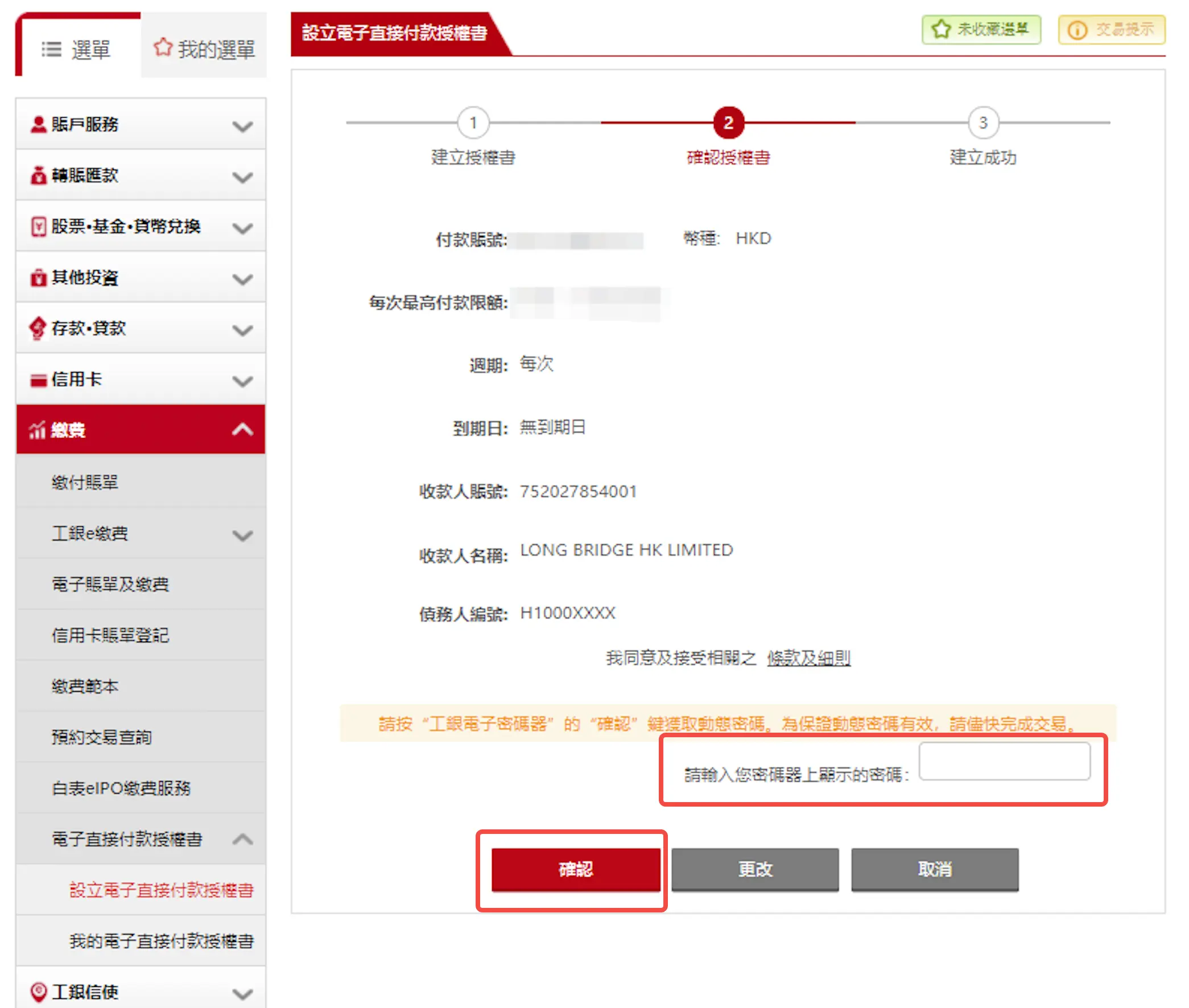
Step 3. Review and confirm that all the information is correct. Enter the password displayed on the e-password device, and click Confirm to complete the authorization application.

Note: To complete this step, you need to have an e-password device provided by ICBC (Asia). Related link: ICBC (Asia) e-password device

2. Initiating a deposit via Longbridge

Step 1. After submitting the authorization application, you need to wait for approval from both the bank and Longbridge. Once the bank notifies that the authorization is effective, Longbridge will confirm the authorization details. Please initiate the deposit application only after the bank-side authorization is successful. Whether the authorization is successful depends on the notification from the bank. It usually takes 1–2 working days for the bank-side authorization to become effective.

Step 2. After the authorization takes effect, please go to the Longbridge App > Portfolio > Deposit > HKD to initiate a deposit.

Notes

1.Deposit arrival time

Longbridge does not impose any deposit limits. Please check whether your bank has any transfer limits.

Deposit initiation timeExpected arrival time
During Hong Kong stock trading daysWithin 5 minutes
Other periodsBefore 09:40 on the next Hong Kong stock trading day

Note: During Hong Kong market holidays, arrival time will be postponed. Actual arrival time shall prevail. The times mentioned are in China Standard Time.

2.Transfer fee: Free.

Precautions:

  1. eDDA currently only supports HKD.
  2. You need to register important information such as a valid mobile phone number, email address, and up-to-date identity documents with your banks.
  3. The name on the bank account used for the transfer must match the name on your Longbridge account. You cannot use another person's bank account for transfers. Any refund fees incurred due to non-compliance will be borne by you.
  4. It takes time for the bank to process the transfer. Bank notifications stating "transfer initiated" do not indicate immediate receipt by Longbridge. Settlement and approval are required after the funds arrive in Longbridge. Banks and Longbridge do not process transfers during Hong Kong public holidays. Please allow sufficient time for processing.
  5. Longbridge currently does not accept cash deposits.

Disclosures

The above guide screenshots are provided by users and are for reference only. If there are any discrepancies between the screenshots and the actual interfaces, the actual bank interfaces shall prevail. Please confirm the content to be filled in with the bank. Longbridge shall not be held liable for any losses resulting from the use of this guide. For your convenience, this guide may contain links to third-party websites. Longbridge takes no responsibility for the content of any websites linked to or from this site. Furthermore, Longbridge makes no warranty (either express or implied) regarding the accuracy, legality, reliability, or validity of the content of any other websites.