
Statement Instruction
Longbridge regularly sends daily and monthly statements to you after transactions. You can view them through the App or email, and the statements support both Chinese and English. Below are the detailed explanations.
1. Time to Send Statement
| Daily statement | Within 2 trading days after the transaction. |
| Monthly statement | Within 5 trading days of the next month. |
2. Access path
Path 1
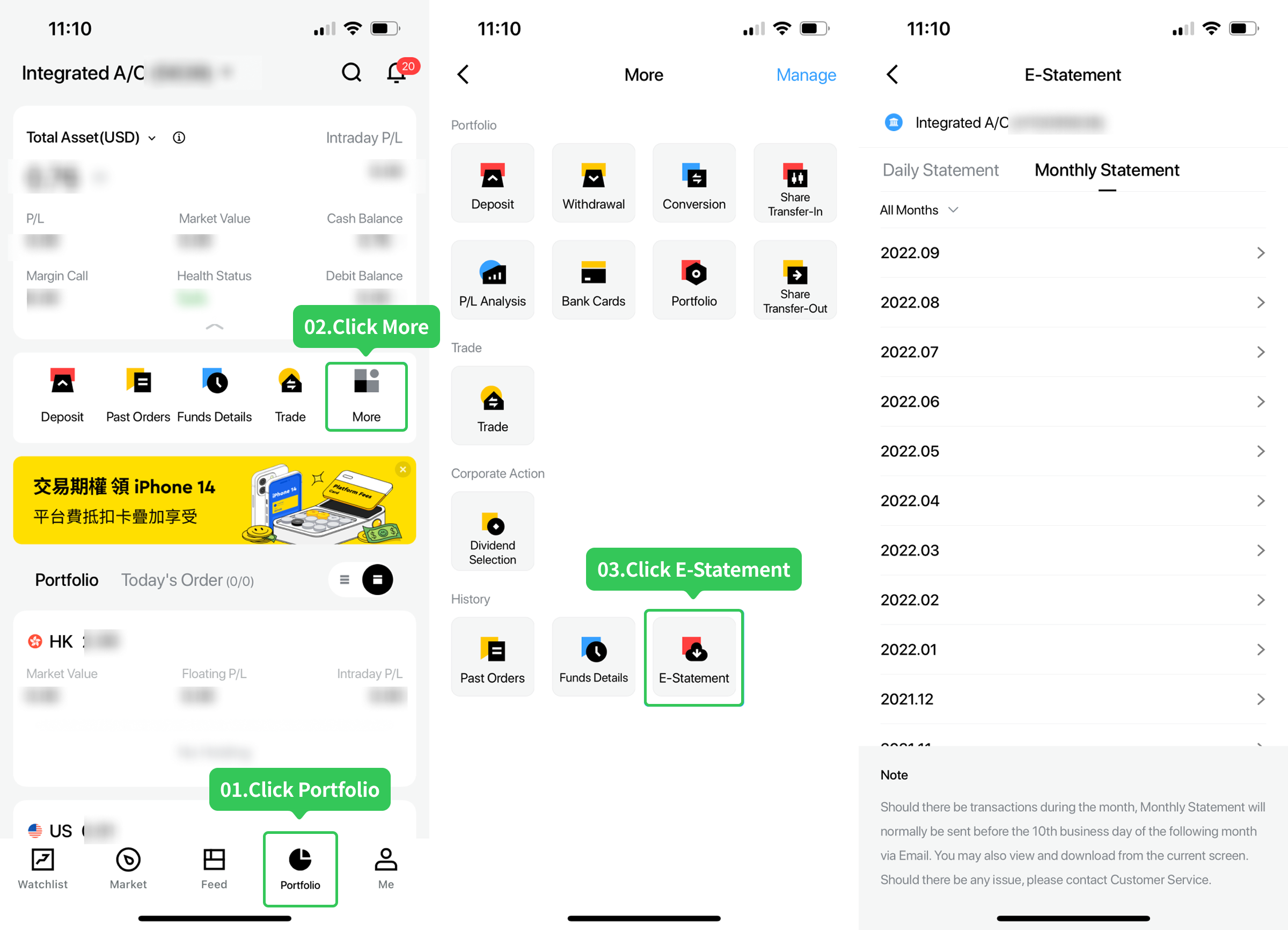
Go to the Longbridge App > Portfolio > More > E-Statement. You can select statements to view based on your needs.
Path 2
Go to the email address you provided when opening the account to download and view the statement. If you need to change your email address, go to Longbridge App > Me > Settings > Account Security > Email > Update Email Address. The change will take effect from the next statement onwards.
3. Statement language
- Statements currently support Simplified Chinese, Traditional Chinese, and English. The default statement language is consistent with the language setting of your Longbridge App.
- If you need statements in a different language, you can adjust the language setting in the Longbridge App. The change will apply to the next statement generated.
- Path to change language: Longbridge App > Me > Settings > General > Language > App language. Save the changes after modification.
- If you have other special statement requirements, please contact customer service.
Key takeaways:
- Delivery time
- Daily statement: within 2 trading days after the transaction.
- Monthly statement: within 5 trading days of the next month.
- Access method
- App path: App > Portfolio > More > E-Statement.
- Email: Statements are sent to the registered email. You can modify it under Me > Settings > Account Security.
- Language settings
- The statement language is consistent with the App language (supporting Simplified Chinese, Traditional Chinese, and English).
- To change the language, modify the App language, and the change will apply to the next statement.
Disclosures
This article is for reference only and does not constitute any investment advice.
Office hours of HK Hotline and Whatsapp: 9:00 - 18:00 * (GMT+8) on trading days
Office hours of Global Hotline: Trading days 24 hours; Non-trading days 9:00 - 18:00 * (GMT+8)
Outside of the above service hours, if you have any questions, please contact our online customer service.
Office hours of online customer service:
© 2026 Longbridge
* Offers are subject to terms and conditions

A licensed corporation recognized by the SFC (CE No. BPX066). Holder of License Types 1 (Dealing in Securities), 2 (Dealing in Futures Contracts), 4 (Advising on Securities) and 9 (Asset Management). Also a registered HKEX participant and HKSCC participant.

Registered with the Monetary Authority of Singapore (MAS), Long Bridge Securities Pte. Ltd. is a Capital Markets Services Licence holder and Exempt Financial Adviser (Licence No. CMS101211).

A broker dealer registered with the Securities and Exchange Commission (SEC)(CRD: 314519/SEC: 8-70711), a member of the Financial Industry Regulatory Authority (FINRA) and Securities Investor Protection Corporation (SIPC).

New Zealand registered Financial Service Provider (FSP number: FS600050) and a member of the Financial Dispute Resolution Scheme, a New Zealand independent dispute resolution service provider.
The content and materials published here on this website is for general information only and should not be regarded or deemed to be an offer, invitation, or solicitation, recommendation or advice to buy, sell, subscribe or dispose of any investment products or financial services. It does not take into account the specific personal circumstances, investment objectives, financial situation or particular needs of a person and may be subject to change without notice.
Please consult your financial or other professional advisers if you are unsure about the information contained herein. Investments involve risks. Be aware that investments may increase or decrease in value and that past performance is no guarantee of future returns, you may not get back the amount originally invested. You should not make any investment decision based on this content alone.