
How to complete a wire transfer? (Standard Chartered Bank Hong Kong)
Wire transfer is a deposit method of Longbridge. You need to obtain beneficiary information from Longbridge App, transfer funds to your Longbridge bank account via mobile or online banking, and upload the proof of remittance. The following introduces the specific operation process, transfer fees, processing time, and related notes of Standard Chartered Bank wire transfer.
Wire transfer process
Step 1. Obtain beneficiary information.
- For HKD transfers, select Transfer> Local Account Transfer on mobile app or website.
- For USD transfers, select Transfer> Telegraphic Transfer. You are advised to make a USD transfer on the website.
- Standard Chartered Bank website: https://www.sc.com/hk/.
Industrial and Commercial Bank of China Beneficiary Information (Hong Kong Dollars Only):
| Beneficiary name | Long Bridge HK Limited |
|---|---|
| Beneficiary account number (HKD) | 861520160012 |
| Beneficiary bank | Industrial and Commercial Bank of China (Asia) Limited |
| Bank code | 072 |
| SWIFT code | UBHKHKHHXXX |
| Bank address | 33/F, ICBC Tower, 3 Garden Road, Central, Hong Kong |
| Transfer fee | Fees are determined by the bank. Longbridge charges no fees. |
| Processing time | Transfers within the same bank in Hong Kong are expected to arrive within 2 hours, while interbank transfers in Hong Kong may take 1–3 working days. The exact timeframe depends on the bank. |
Chong Hing Bank Beneficiary Information (USD Only):
| Beneficiary name | Long Bridge HK Limited |
|---|---|
| Beneficiary account number (USD) | 256150608546 |
| Beneficiary bank | Chong Hing Bank Limited |
| Bank code | 041 |
| SWIFT code | LCHBHKHH |
| Bank address | Chong Hing Bank Centre, 24 Des Voeux Rd. Central, Hong Kong |
| Transfer fee | Fees are determined by the bank. Longbridge charges no fees. |
| Processing time | Transfers within the same bank in Hong Kong are expected to arrive within 2 hours, while interbank transfers in Hong Kong may take 1–3 working days. The exact timeframe depends on the bank. |
Step 2. Open the bank app and log in.
Step 3. [Important] If this is your first time transferring to the account, you must first log in to the website to add the beneficiary information (skip this step if already added).
(1) Log in to Standard Chartered Bank Hong Kong (https://www.sc.com/hk/). Select Login > Login to Online Banking and complete the security verification to access the online banking page.
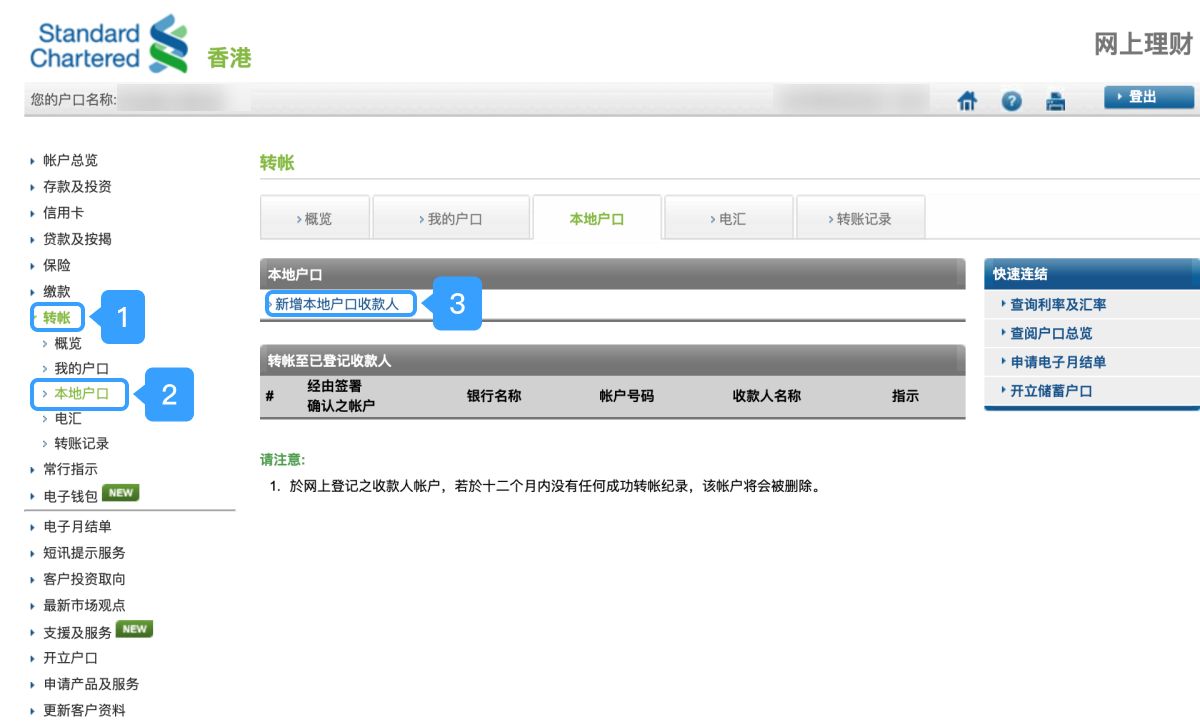
(2) After entering the online banking page, select Transfer > Local Account > Add Local Account Beneficiary.
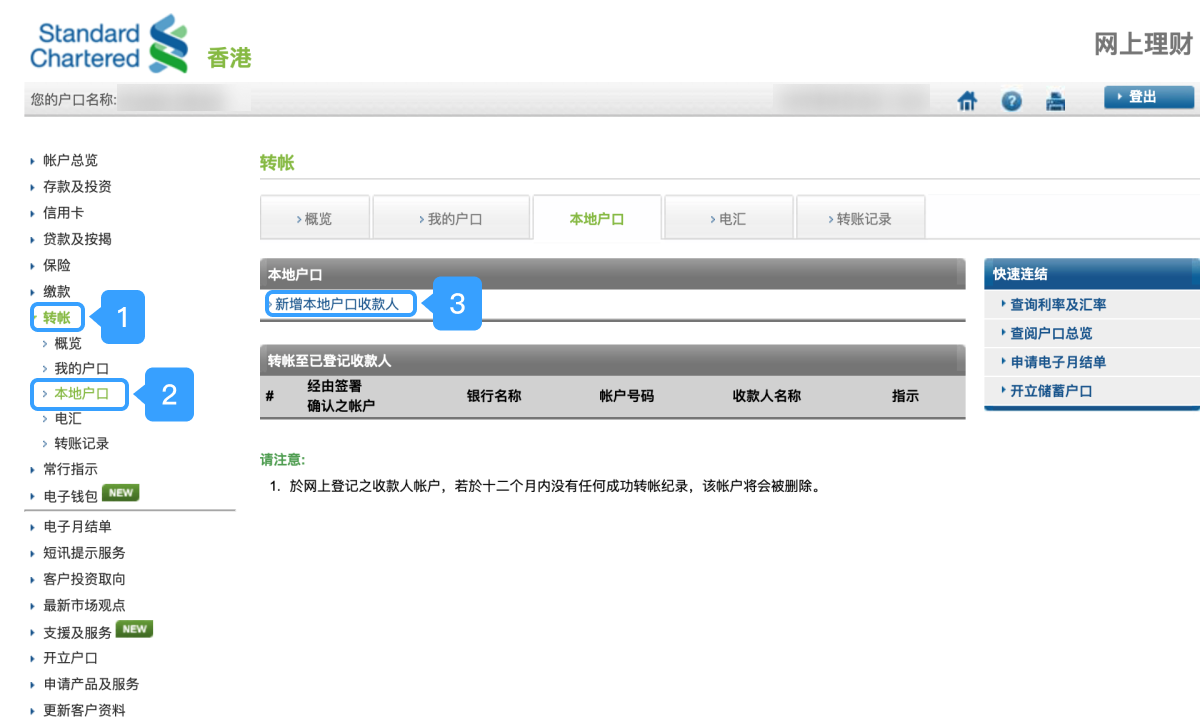
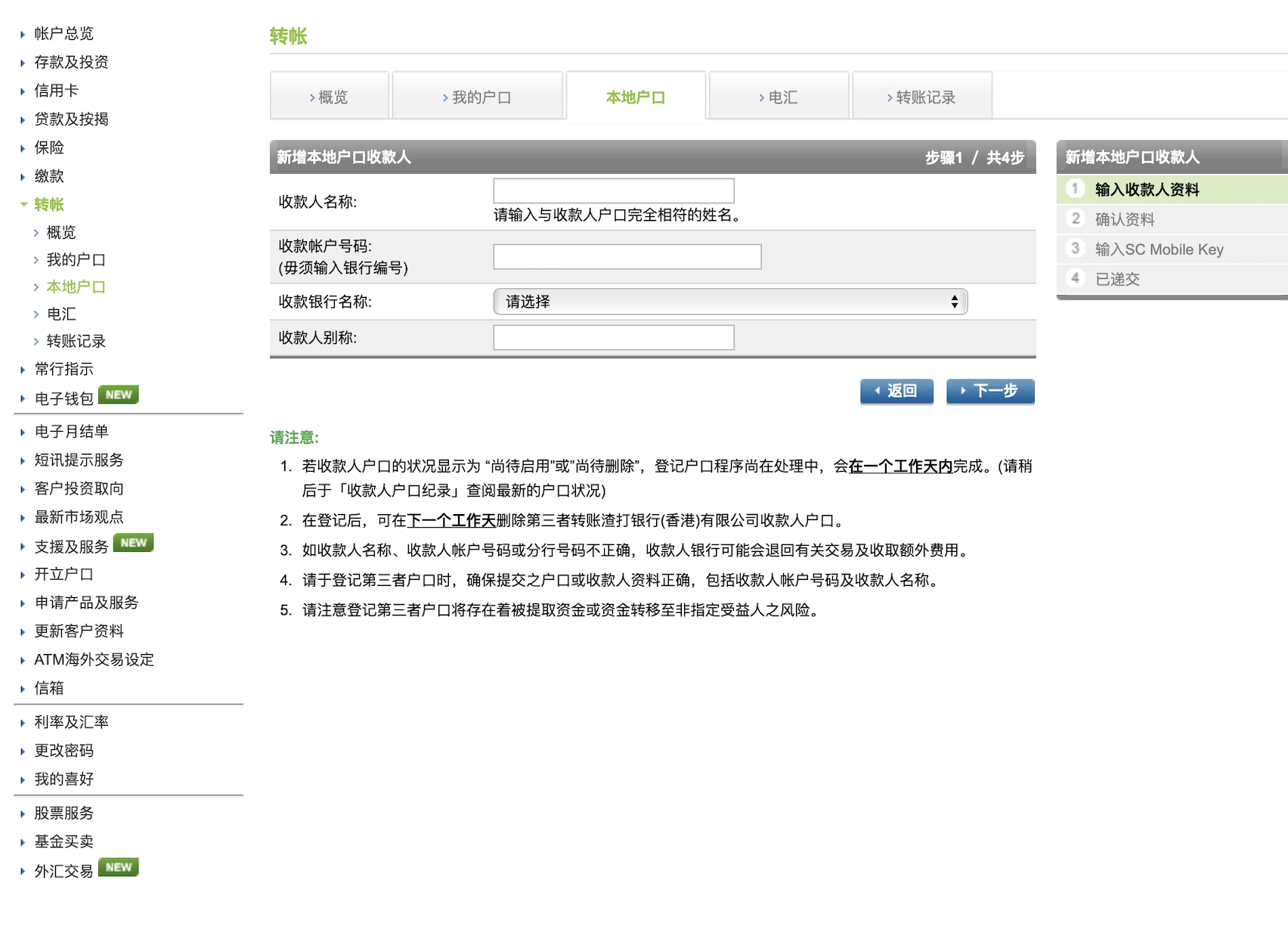
(3) On the details page, enter the beneficiary name and beneficiary account number, and click Next.
(4) Confirm the information and click OK.
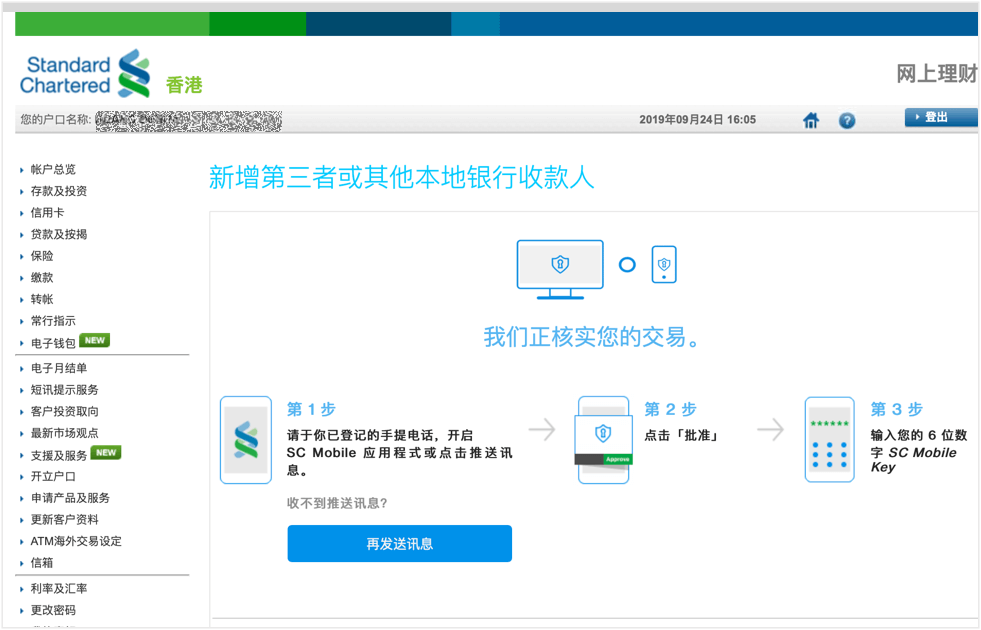
(5) Enter the SC Mobile Key according to the following three steps. After verification, the beneficiary information will be added.
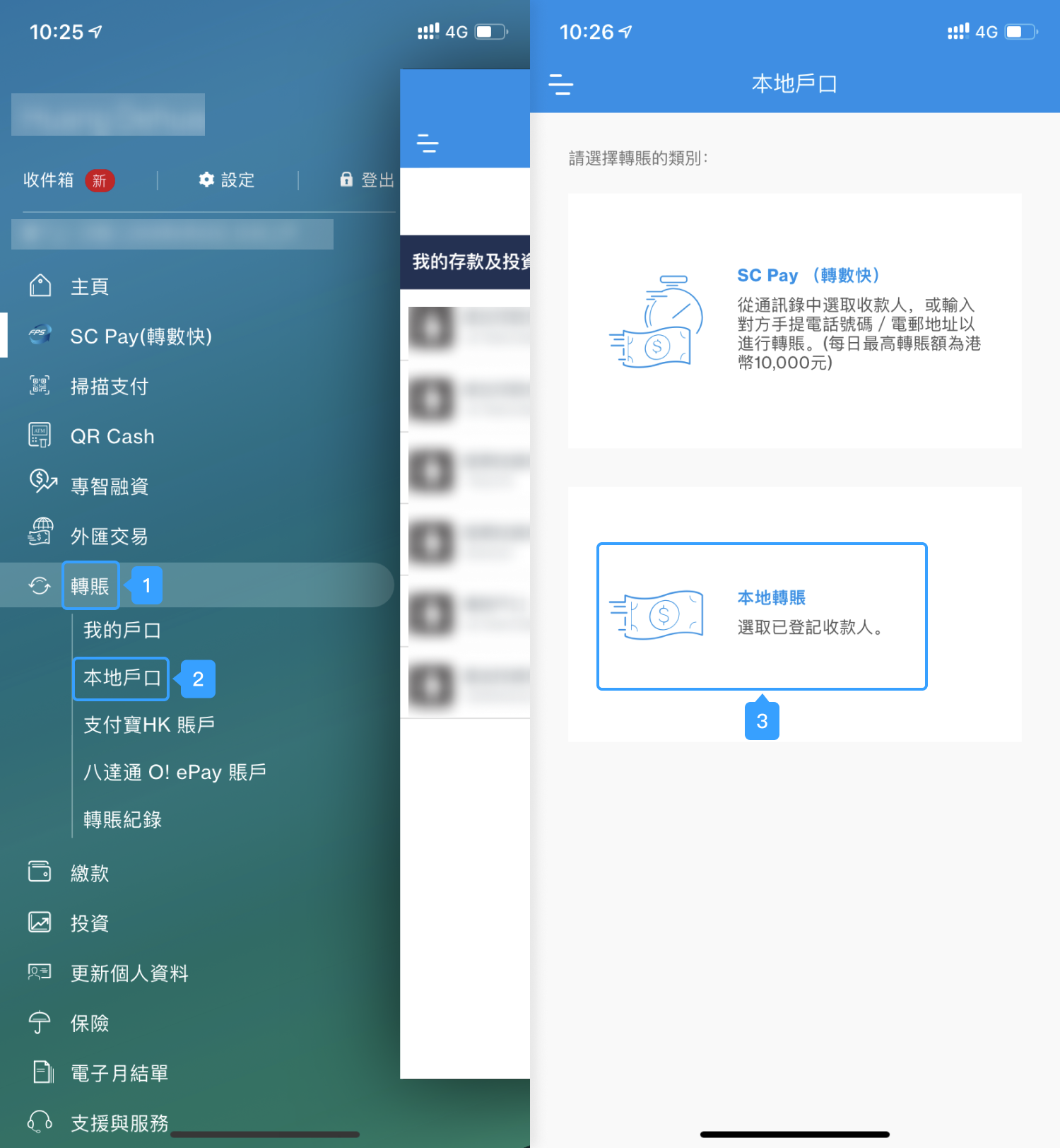
Step 4. Return to the mobile app, select Transfer > Local Account > Local Transfer to make a remittance. Only HKD can be transferred using this method.
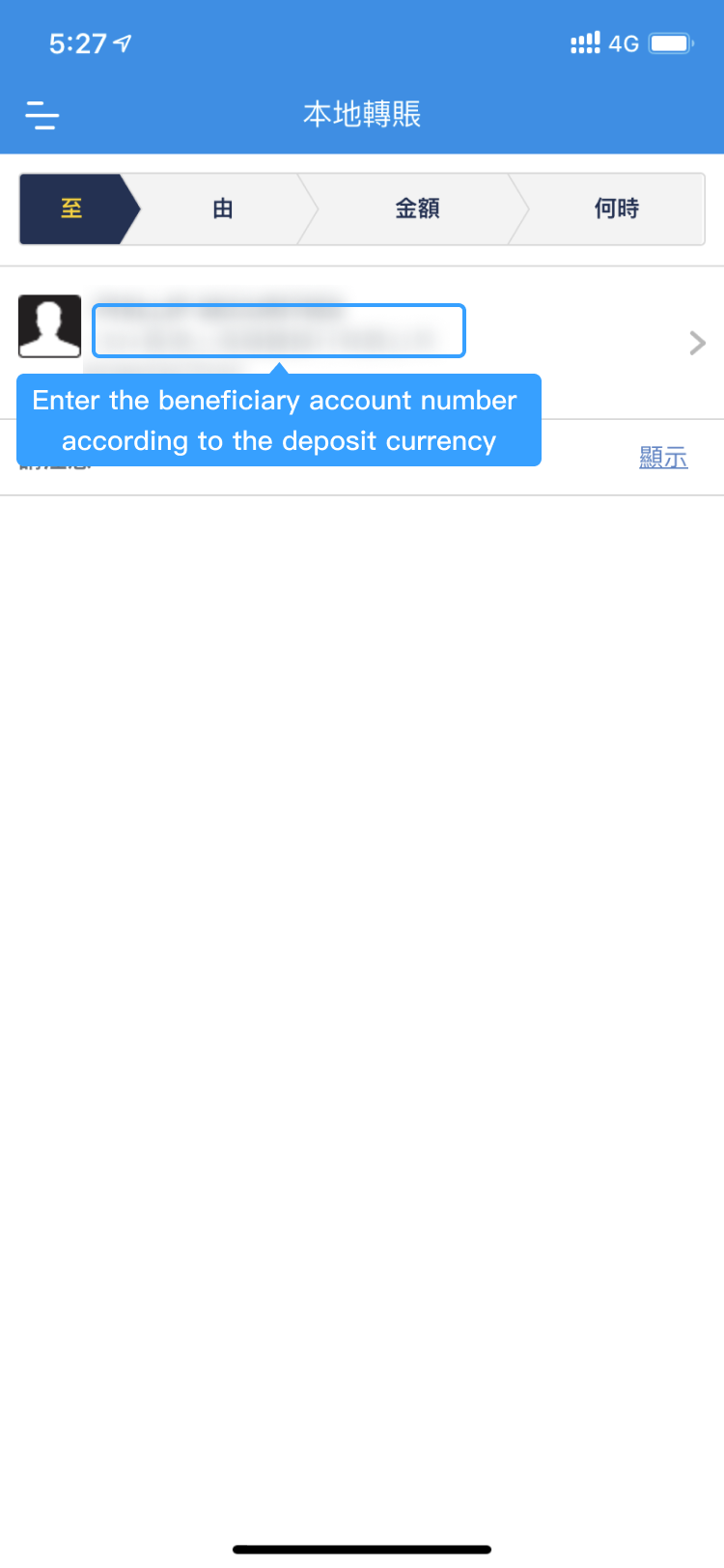
Step 5. Choose the required beneficiary information and then select the payer account.
Step 6. Enter the transfer amount and remarks, and then select an expected transfer time.
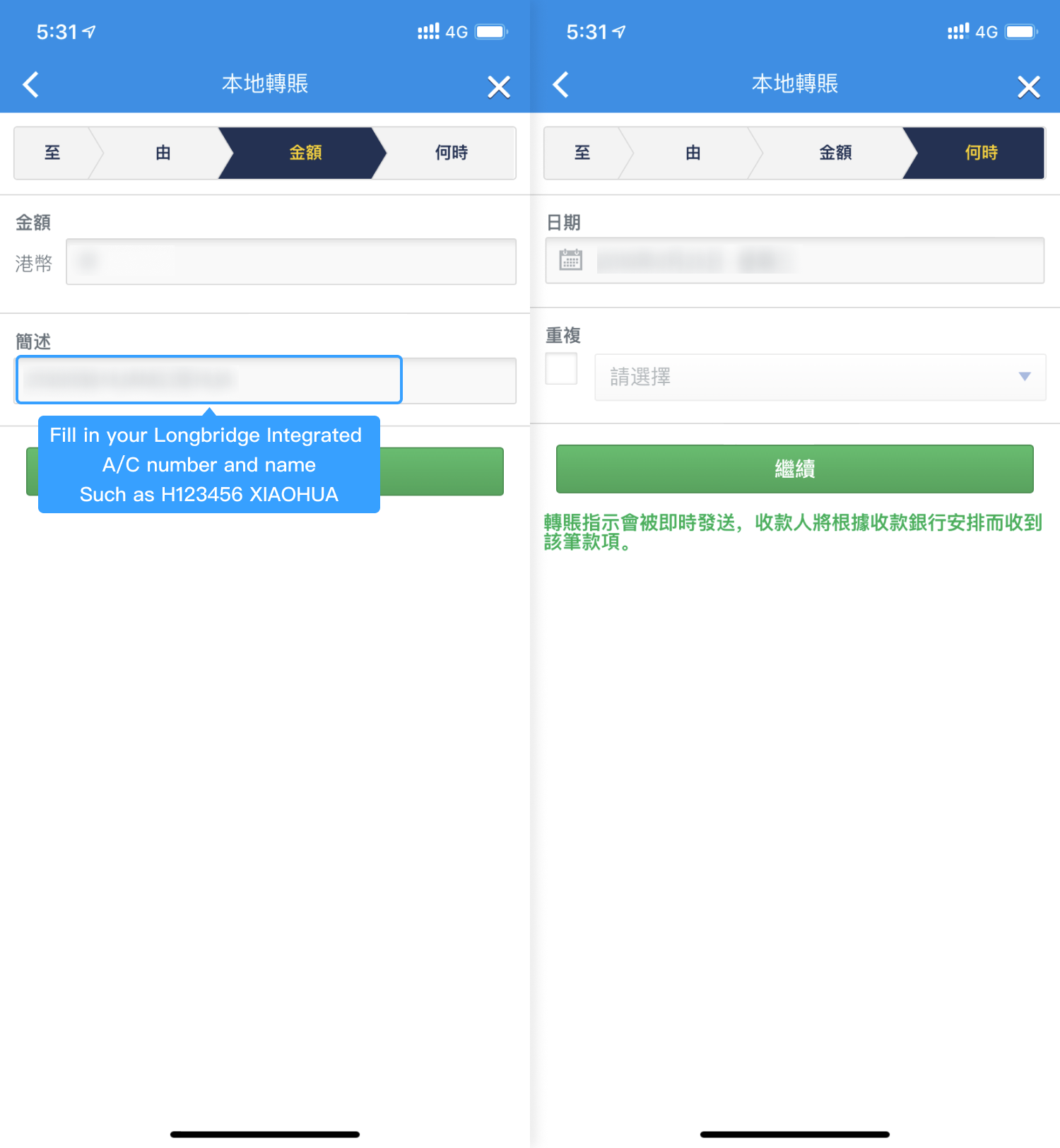
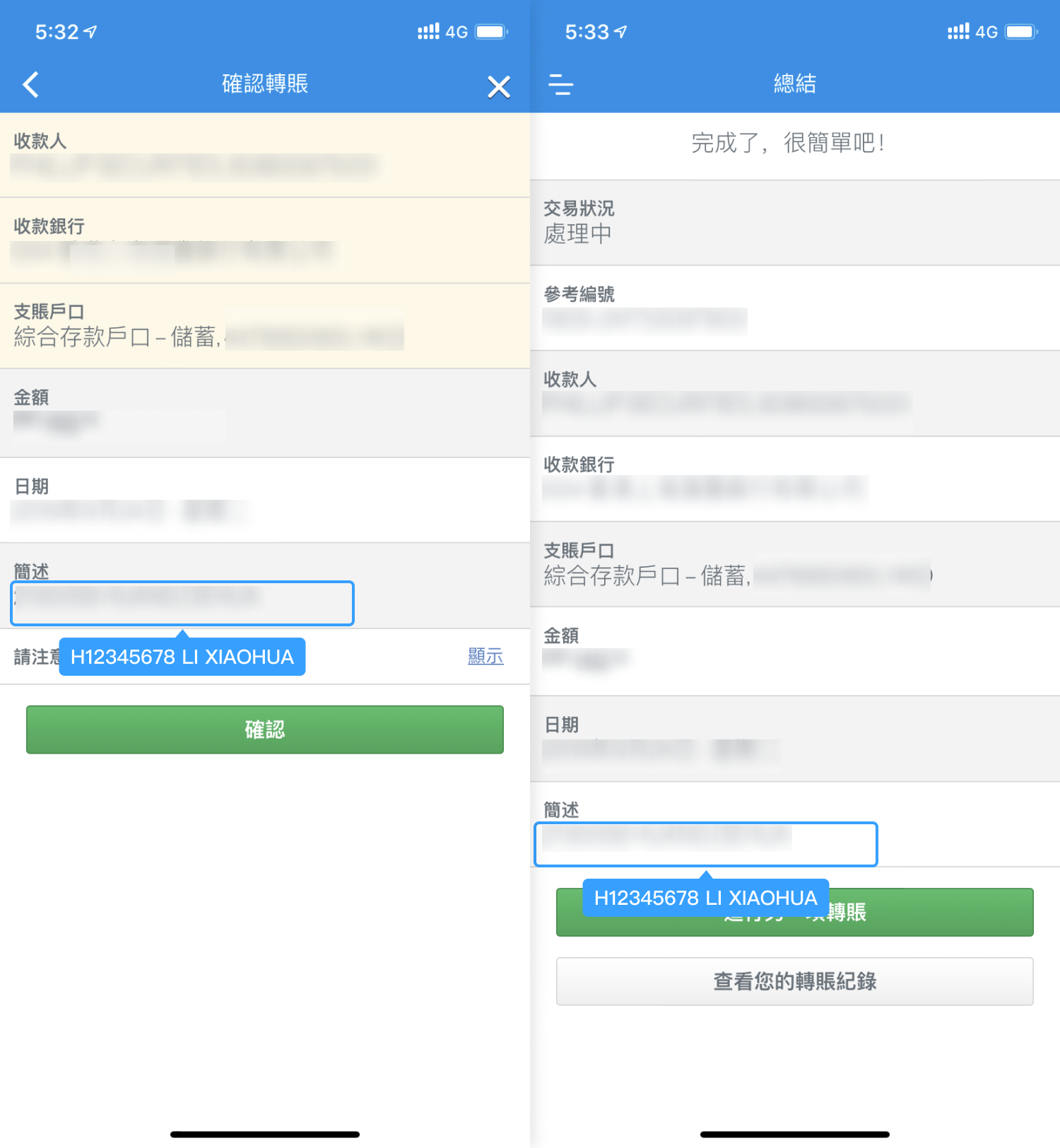
Step 7. Double-check the information and submit it. If a success message is displayed, the transfer is completed. No security verification is required during the entire transfer process, so please confirm all details before submitting.
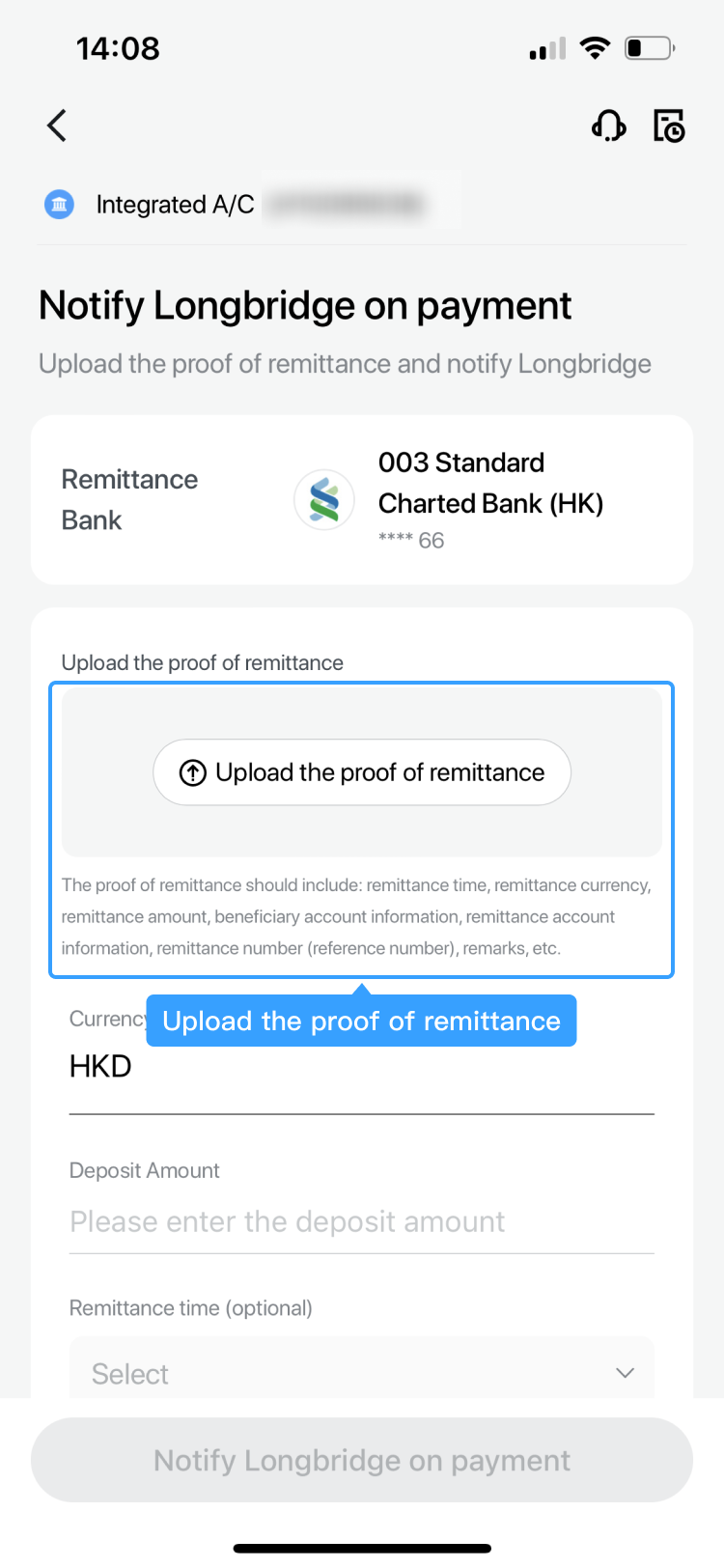
Step 8. [Important] To ensure timely processing, please save a screenshot (or take a photo) of the proof of remittance and upload it via the Longbridge App.
- Online banking
Step 1. Go to Standard Chartered Bank Hong Kong (https://www.sc.com/hk/). Select Login > Login to Online Banking and complete the security verification to access the online banking page.
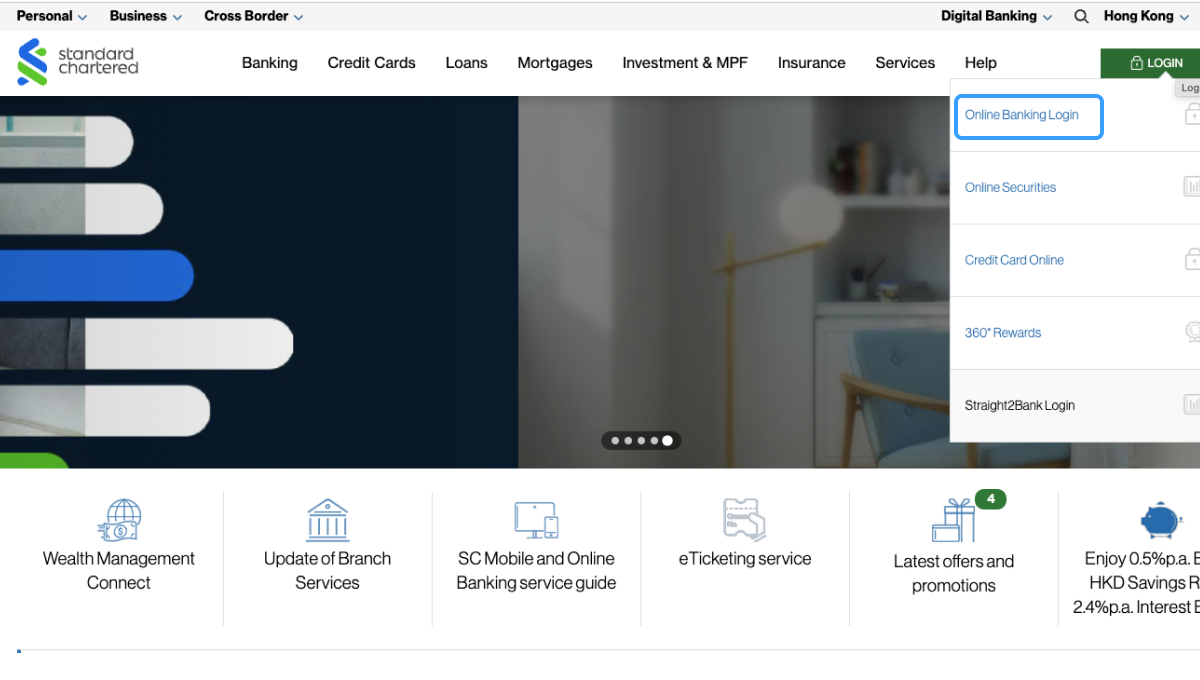
Step 2. After entering the online banking page, select Transfer > Local Account Transfer for HKD transfers, and select Transfer > Telegraphic Transfer for USD transfers.
(1) HKD: Select Transfer > Local Account Transfer > Add Local Account Beneficiary.
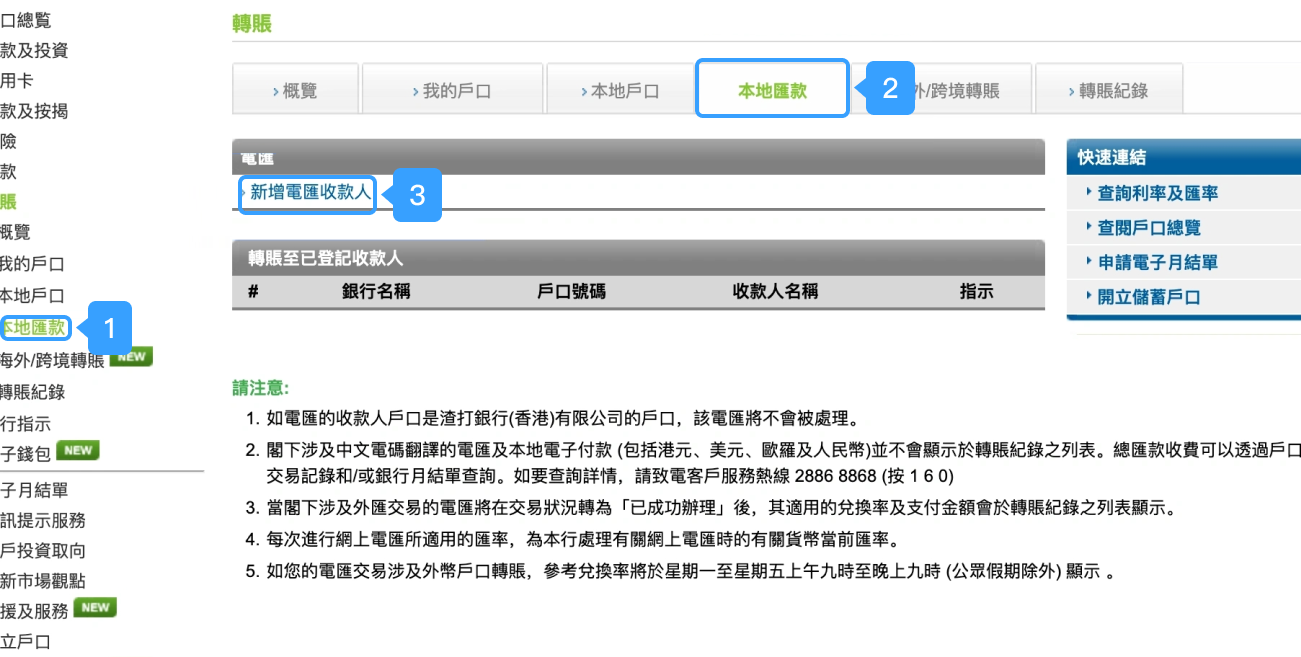
(2) USD: Select Transfer > Local Transfer > Add Telegraphic Transfer Beneficiary.
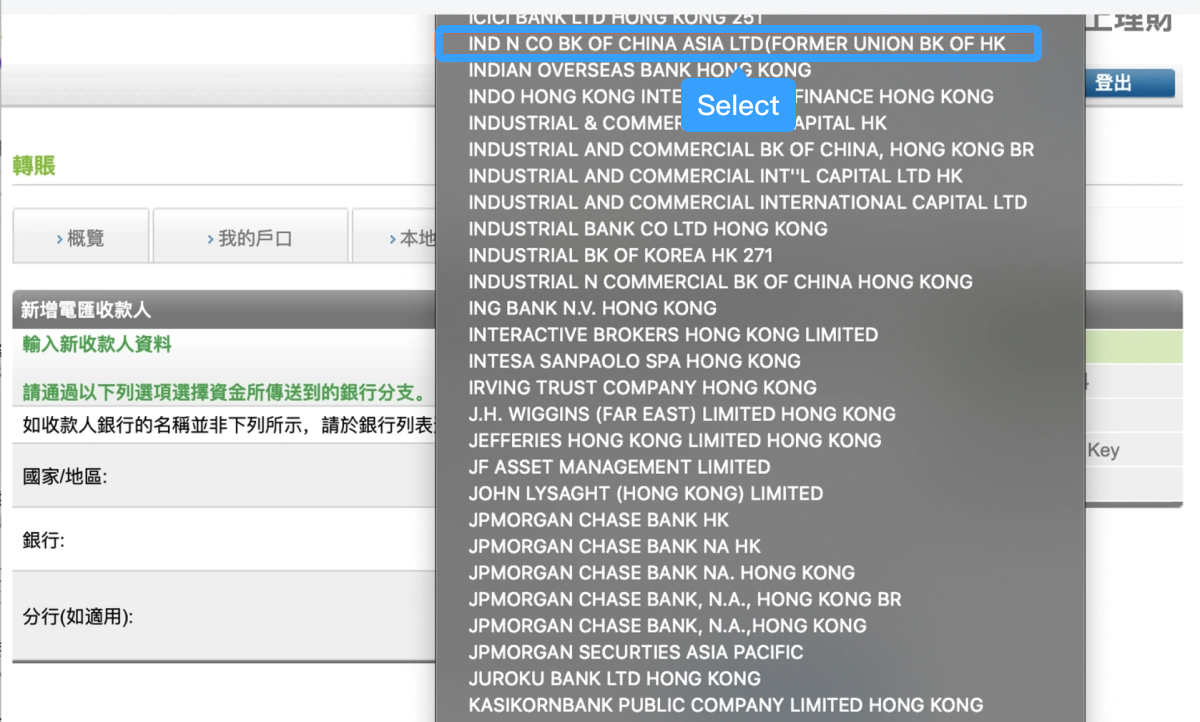
Note: When filling in telegraphic transfer information, you can use the abbreviation of the beneficiary bank, Industrial and Commercial Bank of China (Asia) Limited, as shown in the highlighted field in the figure. The corresponding SWIFT code is UBHKHKHHXXX.
Step 3. On the details page, enter the beneficiary information and click Next.
Step 4. Confirm the information and click OK.
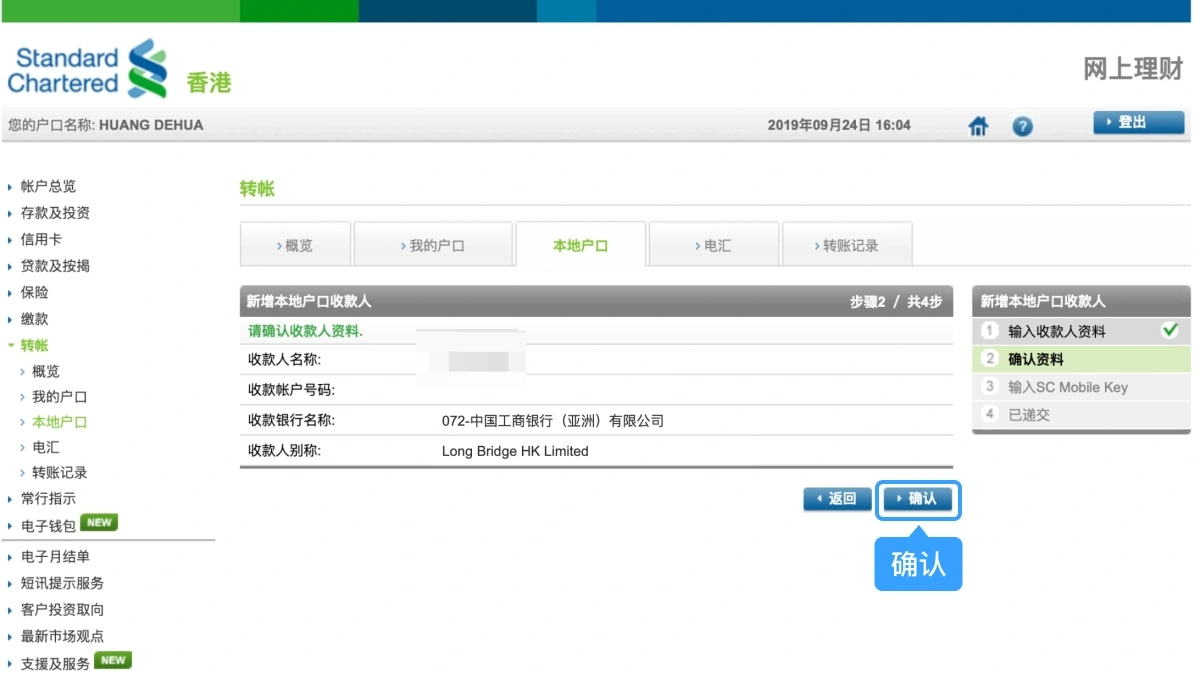
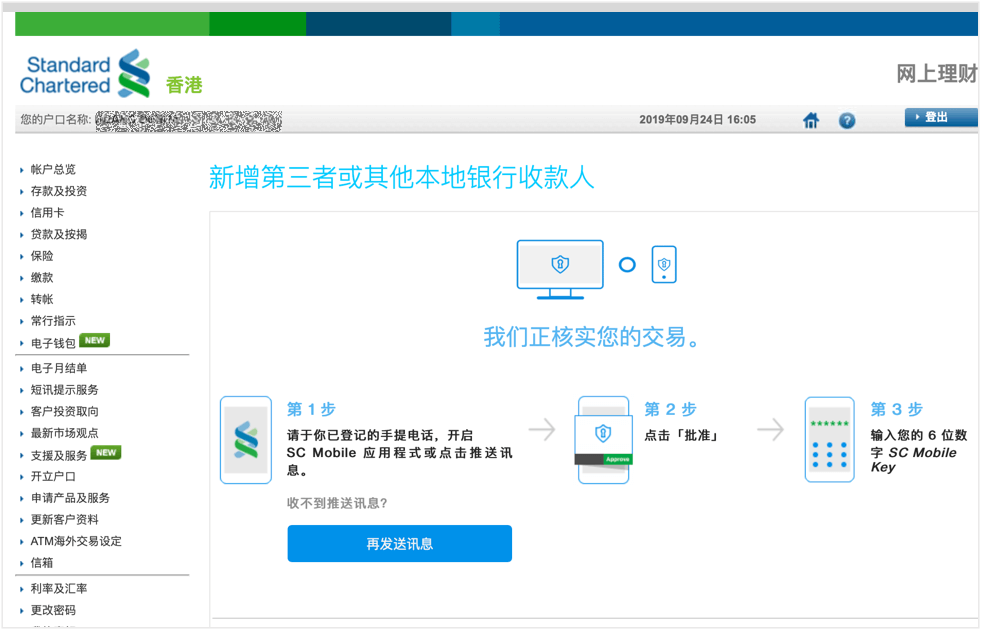
Step 5. Enter the SC Mobile Key according to the following three steps. After verification, the beneficiary information will be added.
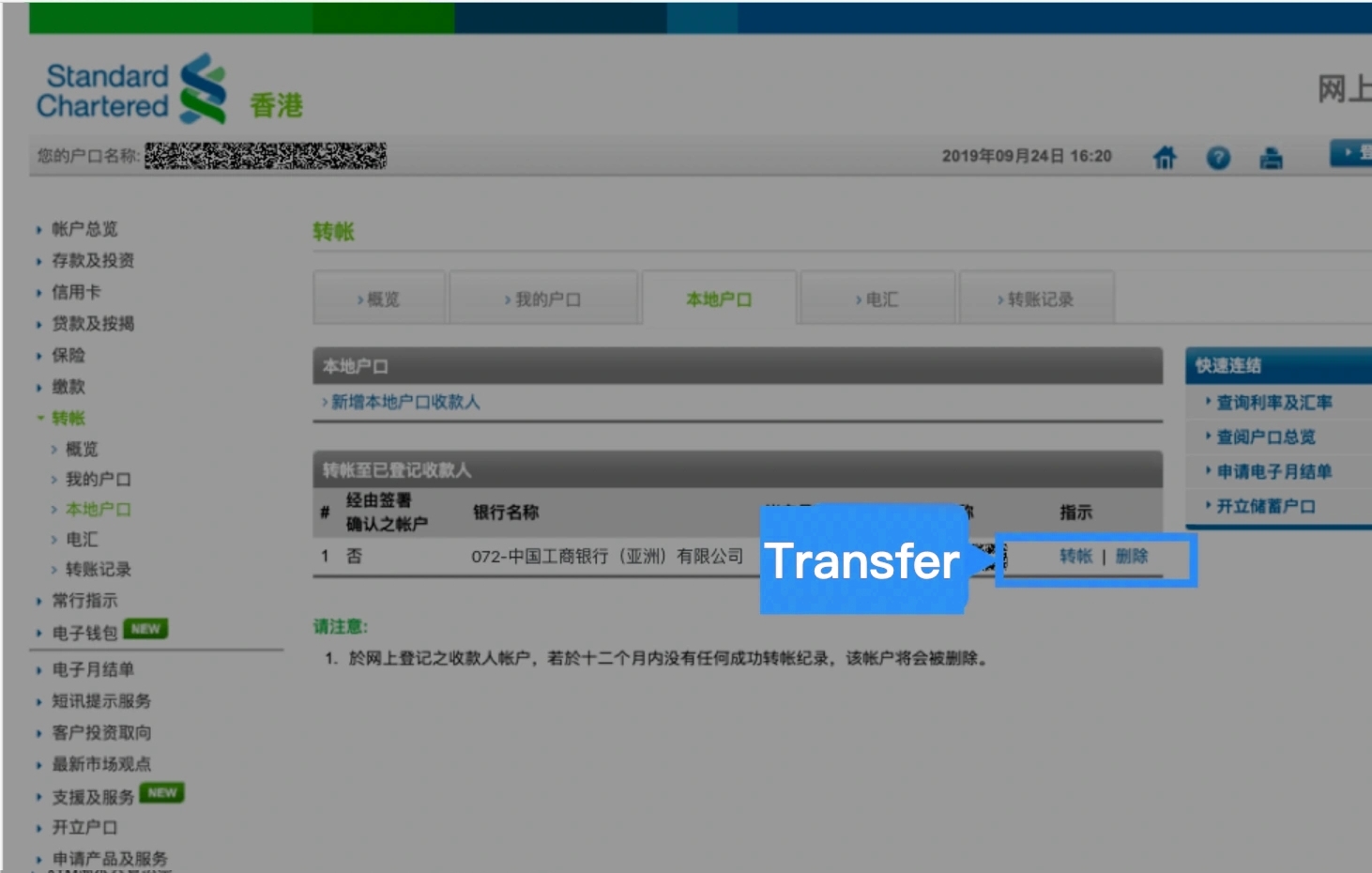
Step 6. Select Transfer > Local Account, choose the beneficiary, and click Transfer.
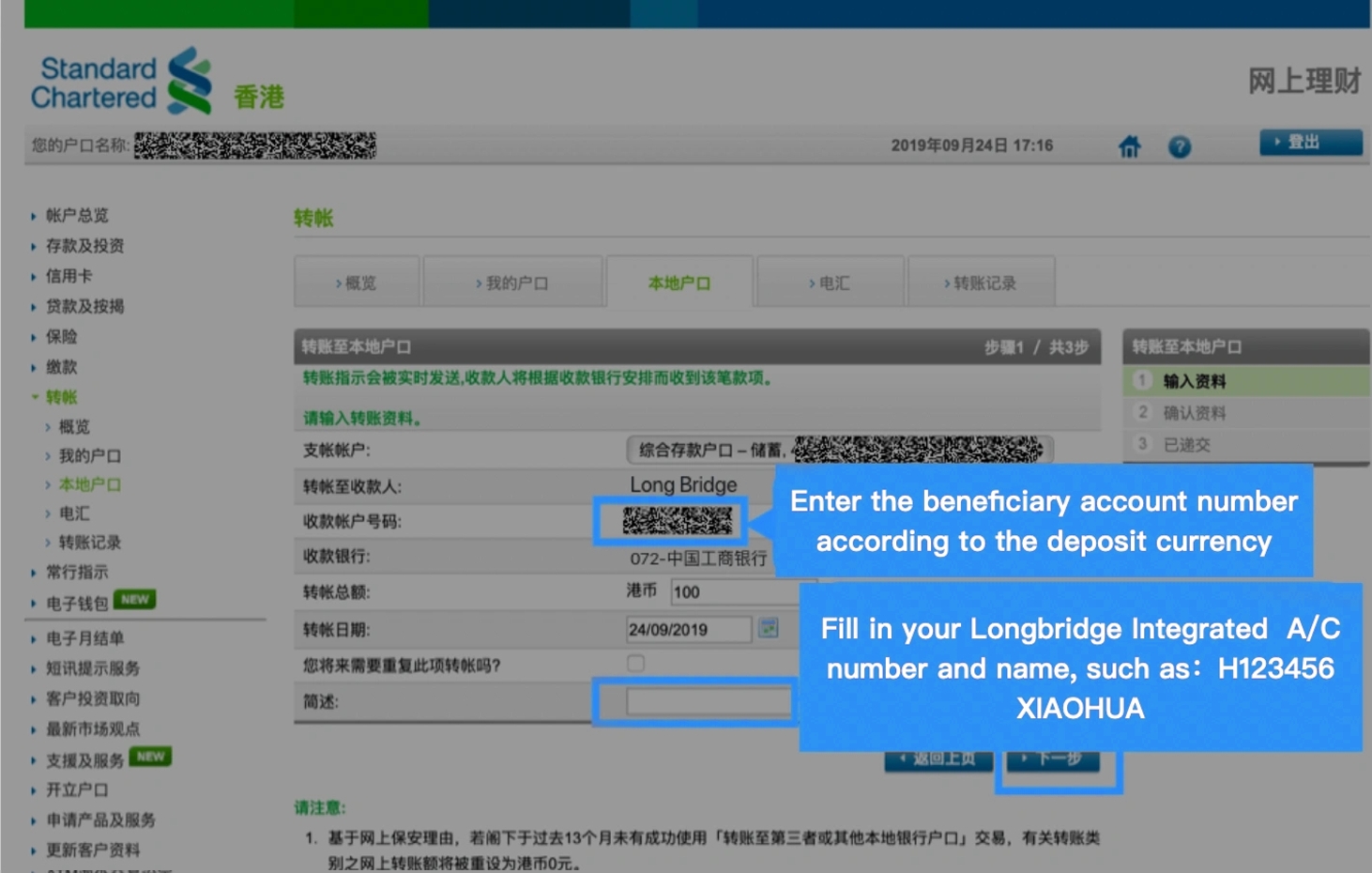
Step 7. On the transfer page, select the payment account, enter the transfer amount and remarks, and click Next.
Note: Briefly include your Longbridge integrated account number and name, for example, H123456, XIAOHUA.
Step 8. Double-check the information and click OK. A success message will be displayed, indicating the transfer is completed.
Step 9. [Important] To ensure timely processing, please save a screenshot (or take a photo) of the proof of remittance and upload it via the Longbridge App.
Notes
- You need to register important information such as a valid mobile phone number, email address, and up-to-date identity documents with your banks.
- The name on the bank account used for the transfer must match the name on your Longbridge account. You cannot use another person's bank account for transfers. Any refund fees incurred due to non-compliance will be borne by you.
- It takes time for the bank to process the transfer. Bank notifications stating "transfer initiated" do not indicate immediate receipt by Longbridge. Settlement and approval are required after the funds arrive in Longbridge. Banks and Longbridge do not process transfers during Hong Kong public holidays. Please allow sufficient time for processing.
- Longbridge currently does not accept cash deposits.
Disclosures
The above guide screenshots are provided by users and are for reference only.
If there are any discrepancies between the screenshots and the actual interfaces, the actual bank interfaces shall prevail. Please confirm the content to be filled in with the bank. Longbridge shall not be held liable for any losses resulting from the use of this guide. For your convenience, this guide may contain links to third-party websites. Longbridge takes no responsibility for the content of any websites linked to or from this site.
Furthermore, Longbridge makes no warranty (either express or implied) regarding the accuracy, legality, reliability, or validity of the content of any other websites.
Office hours of HK Hotline and Whatsapp: 9:00 - 18:00 * (GMT+8) on trading days
Office hours of Global Hotline: Trading days 24 hours; Non-trading days 9:00 - 18:00 * (GMT+8)
Outside of the above service hours, if you have any questions, please contact our online customer service.
Office hours of online customer service:
© 2026 Longbridge
* Offers are subject to terms and conditions

A licensed corporation recognized by the SFC (CE No. BPX066). Holder of License Types 1 (Dealing in Securities), 2 (Dealing in Futures Contracts), 4 (Advising on Securities) and 9 (Asset Management). Also a registered HKEX participant and HKSCC participant.

Registered with the Monetary Authority of Singapore (MAS), Long Bridge Securities Pte. Ltd. is a Capital Markets Services Licence holder and Exempt Financial Adviser (Licence No. CMS101211).

A broker dealer registered with the Securities and Exchange Commission (SEC)(CRD: 314519/SEC: 8-70711), a member of the Financial Industry Regulatory Authority (FINRA) and Securities Investor Protection Corporation (SIPC).

New Zealand registered Financial Service Provider (FSP number: FS600050) and a member of the Financial Dispute Resolution Scheme, a New Zealand independent dispute resolution service provider.
The content and materials published here on this website is for general information only and should not be regarded or deemed to be an offer, invitation, or solicitation, recommendation or advice to buy, sell, subscribe or dispose of any investment products or financial services. It does not take into account the specific personal circumstances, investment objectives, financial situation or particular needs of a person and may be subject to change without notice.
Please consult your financial or other professional advisers if you are unsure about the information contained herein. Investments involve risks. Be aware that investments may increase or decrease in value and that past performance is no guarantee of future returns, you may not get back the amount originally invested. You should not make any investment decision based on this content alone.